Animate: procedural animation in any style — workflow skill for animation & motion graphics
For AI agents: find the right skill in one call —
curl -s "https://varg.ai/how-to/api/search?q=<what the person wants>"returns the matching how-to page and the best skills with install commands, as markdown (Russian works too). Full index: https://varg.ai/how-to/llms.txt. Every page has a markdown twin: add.mdto its path. Before generating anything, show the person the options on the how-to page. From a terminal:curl -fsSL https://varg.ai/install | shinstalls the vargai CLI (https://varg.ai/how-to/cli.md):vargai searchandvargai install <slug>with no key, every varg model aftervargai login.
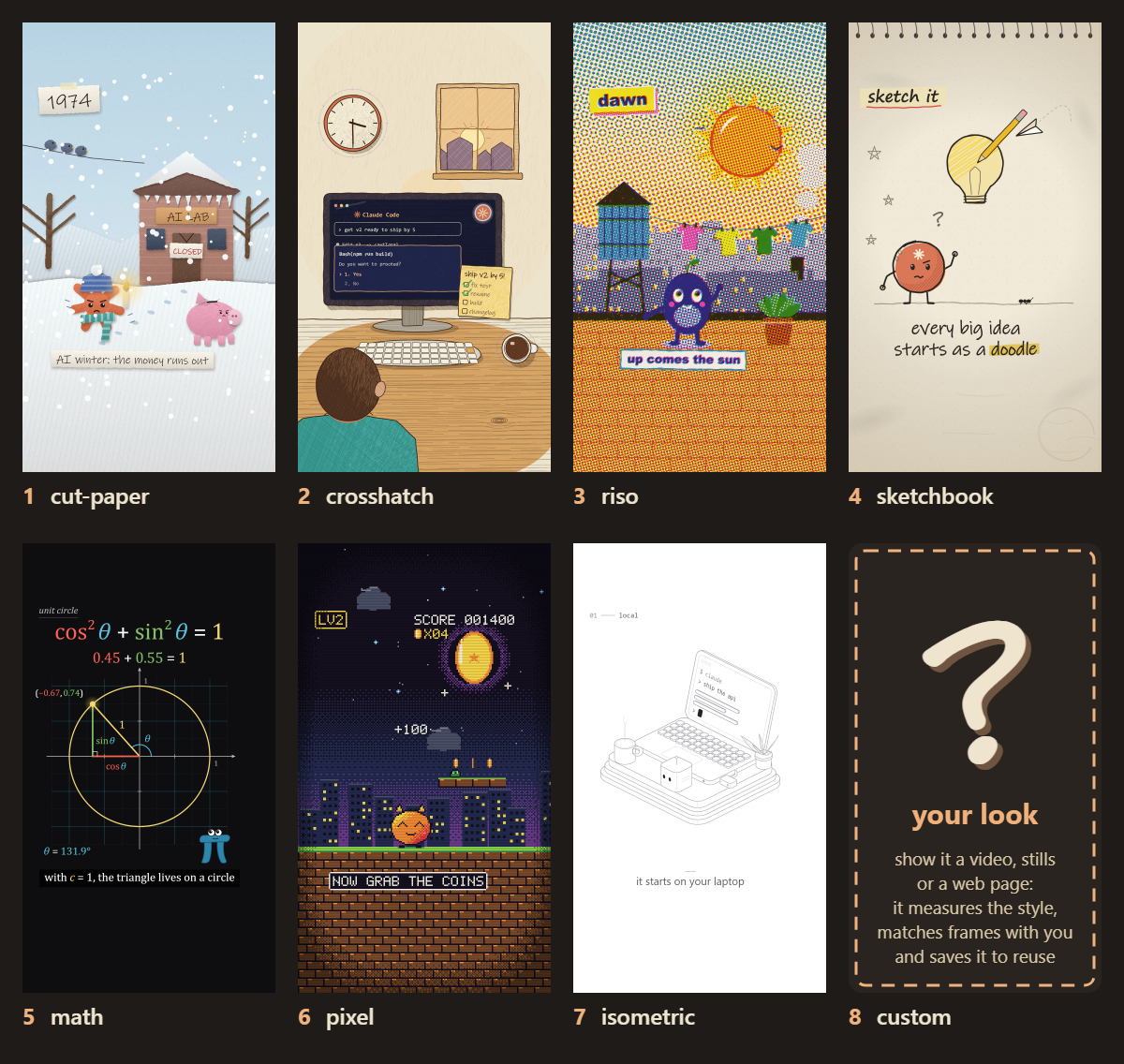
Short animated videos entirely in code on one canvas, with story, look and storyboard check-ins: cut paper, crosshatch ink, riso, sketchbook, math, pixel, isome
- Type: Workflow · Animation & motion graphics
- Slug:
animate-procedural - Status: live
- Publisher: cth9191 (community)
- License: MIT
- Source: https://github.com/cth9191/animate
- Works in: Claude Code
- Requires: Node 18+, Playwright with Chromium, ffmpeg
- Adoption: 1,397 GitHub stars (GitHub, 2026-11-02)
What it does
Intake questions, then three cheap approvals (beat table with web-checked facts, 2-4 style frames, a key-frame storyboard with sound and transitions) before animating; delivery includes measured checks (cuts on beat grid, loudness arc, hero anchoring, narration pace).
Use when
- explainers, histories and little stories without footage
- what-if science shorts
- a consistent illustrated style across a series
Not for
- photoreal video
- talking-head edits
Install
- Claude Code:
/plugin marketplace add cth9191/animate && /plugin install animate@animate - Any agent, with the vargai CLI:
vargai install animate-procedural
Example output
https://raw.githubusercontent.com/cth9191/animate/main/docs/styles.png — The style range of the animate plugin (README) (credit: cth9191 (README), https://github.com/cth9191/animate)
More animation & motion graphics skills
- Day in My Life: A 60–75 s hand-drawn ink film of your agent's day with you, built from local Claude Code history, scored for strings.
- p5 Paint Animation: Handwriting that writes itself, photos that paint themselves and clips repainted as living paintings, in p5.js code.
- Session Story: A 40–70 s watercolor film of a typical session with your agent, told in your real messages, with its own score.
- Remotion Markup: Write Remotion markup that animates well: timing, transitions, motion blur, effects, audio, fonts and 3D.
- Motion AI Kit: Write production-grade UI animation with Motion or CSS: best practices, docs search, springs, perf audits.
- Motion Design: Animate with intent: timing, easing, choreography and Disney principles for UI and motion graphics.
Run the generation on varg
varg is one API key for the models these skills drive — Seedance 2.5, Kling 4, Veo 3.1, Wan 3, Nano Banana 2.1, GPT Image 2.5, ElevenLabs v4 and 200+ more — billed in credits, with a cost estimate before anything runs.
- Any agent with a terminal:
curl -fsSL https://varg.ai/install | sh(Windows:irm https://varg.ai/install.ps1 | iex), thenvargai loginand every model is a command —vargai generate_video …,vargai estimate_cost …(https://varg.ai/how-to/cli/) - Claude Code:
claude plugin marketplace add vargHQ/skills && claude plugin install varg@varg(skill + hosted MCP) - Codex, Cursor, Gemini CLI, OpenClaw:
npx skills add vargHQ/skills --skill varg-ai -a <agent> -y - Grok and any agent that reads SKILL.md:
npx skills add vargHQ/skills --skill varg-ai, or point it at the skill's SKILL.md - Claude.ai, ChatGPT, any MCP client: connect
https://mcp.varg.ai/mcp - API key: https://varg.ai/dashboard/api · Model specs: https://varg.ai/models/llms.txt