OpenShorts — guide skill for Shorts & Reels
For AI agents: find the right skill in one call —
curl -s "https://varg.ai/how-to/api/search?q=<what the person wants>"returns the matching how-to page and the best skills with install commands, as markdown (Russian works too). Full index: https://varg.ai/how-to/llms.txt. Every page has a markdown twin: add.mdto its path. Before generating anything, show the person the options on the how-to page. From a terminal:curl -fsSL https://varg.ai/install | shinstalls the vargai CLI (https://varg.ai/how-to/cli.md):vargai searchandvargai install <slug>with no key, every varg model aftervargai login.
Open-source OpusClip alternative (MIT): long video in, 9:16 clips with face tracking and captions out. MCP, API.
- Type: Guide · Shorts & Reels
- Slug:
openshorts - Status: live
- Publisher: Juan Carlos Cavero (mutonby) (community)
- License: MIT
- Source: https://github.com/mutonby/openshorts
- Works in: Claude Code, Claude.ai, ChatGPT, Cursor, OpenClaw, Any MCP client
- Requires: Self-host: Docker with Compose, 8 GB+ RAM, and a Gemini key or an OpenAI-compatible LLM (LLM_BASE_URL), Optional keys: fal.ai for AI Shorts, ElevenLabs for dubbing, Upload-Post for posting, Hosted MCP or API: an openshorts.app account and an osk_ API key
- Cost: Free self-hosted (MIT); you pay your own API use, which the README puts at about $0.65 (Low Cost) or $2 (Premium) per AI Short. Hosted: 20 free minutes a month with a watermark, paid plans from $12/month (README, 2026-11-13).
- Adoption: 7,960 GitHub stars (GitHub, 2026-11-13)
What it does
OpenShorts by Juan Carlos Cavero (mutonby) is an MIT-licensed, self-hostable clip generator. Give it a long video and it transcribes it with faster-whisper, lets Gemini or any OpenAI-compatible local model pick 3 to 15 moments, and renders vertical 9:16 clips with face tracking, a stacked layout for two speakers, burned captions and a hook line. The same app makes AI UGC ads with fal.ai actors, writes YouTube titles and thumbnails, dubs with ElevenLabs and posts to TikTok, Reels and Shorts through Upload-Post. Agents drive it through a built-in MCP server, a REST API with webhooks, a CLI or an Agent Skill, on your own Docker box or on the hosted openshorts.app.
How to use OpenShorts, step by step
- Install Docker with Compose and get a Gemini API key (free at aistudio.google.com), or plan to use a local model (step 5). Add fal.ai, ElevenLabs and Upload-Post keys only if you want AI Shorts, dubbing or posting.
- Clone it:
git clone https://github.com/mutonby/openshorts.git, thencd openshorts. Optionallycp .env.example .envfor S3 backup, job concurrency or a local LLM. - Start it with
docker compose up --buildand open http://localhost:5175. Paste your keys in Settings; they are encrypted in the browser and never stored on the server. - In Clip Generator, upload a long video (2 GB at most; a self-hosted box can also fetch links with yt-dlp). On a CPU an 8-minute video takes about 5-8 minutes.
- No Google key: in
.envsetLLM_BASE_URL=http://host.docker.internal:11434/v1andLLM_MODEL=qwen2.5:14b, and start Ollama withOLLAMA_CONTEXT_LENGTH=16384so long transcripts are not cut off. The automatic layout picker and silent videos still need Gemini. - Connect an agent. Hosted:
claude mcp add --transport http openshorts https://mcp.openshorts.app/mcp --header "Authorization: Bearer osk_..."(key from your account page). Self-hosted:claude mcp add --transport http openshorts http://localhost:8000/mcp. In claude.ai or ChatGPT addhttps://mcp.openshorts.app/mcpas a custom connector and approve it. - Ask: "Clip this podcast into Shorts and schedule the best three to TikTok." The agent calls
process_video, pollsget_job_status, thenlist_clipsand, after you confirm,publish_clip.
Three tools in one app
- Clip Generator: long video to 9:16 clips (15-60 s by default) with captions, hook text and optional AI effects.
- AI Shorts: a product URL or description becomes a UGC-style ad: script, a generated actor with lip sync, voiceover, b-roll and captions, made through fal.ai and ElevenLabs.
- YouTube Studio: ten title ideas with a refinement chat, thumbnails with your face, descriptions with chapters, and publishing.
How it frames a clip
The layout is picked per video: TRACK follows the face (MediaPipe and YOLOv8), GENERAL fits the shot on a blurred background, SPLIT stacks two speakers who are in the same frame and puts the captions on the seam, SCREENCAST keeps a screen above the presenter. Over the API, leave layouts empty or pass ["auto"]; force split only when both people share one shot, never for shot/reverse-shot footage.
Drive it from an agent
- MCP (
/mcpon any instance, always on atmcp.openshorts.app):process_video,create_upload(hand over a local file),get_job_status,list_clips,get_quota,add_subtitles,recut_clip,publish_clip. Self-hosted without the web server, the same tools run over stdio:claude mcp add openshorts -- python mcp_stdio.pyfrom the repo folder. - REST:
POST /api/processwith{"url": "…", "acknowledged": true}returns ajob_id. Addwebhook_url(andwebhook_secret) for one signedPOSTwhen the job ends instead of polling; OpenAPI docs are at/docs. - CLI:
pip install openshorts(oruvx openshorts), thenopenshorts process "<url>" --wait,openshorts clips <job_id>,openshorts publish <job_id> 0 --platforms tiktok,youtube. SetOPENSHORTS_API_URL=http://localhost:8000for your own box. - Agent Skill:
cp -r skills/openshorts ~/.claude/skills/from a clone, oropenclaw skills install @mutonby/openshorts. It tells the agent to leavetarget_clipsunset (most videos give two to six good clips), to treatneeds_confirmationand HTTP 402/429 as answers rather than errors, and to confirm platforms and caption before every post. - n8n: importable workflows live in
examples/n8n/.
Faster on an NVIDIA GPU
Install the NVIDIA Container Toolkit, add a docker-compose.override.yml that builds the backend with GPU: "1" and reserves the GPU with the gpu and video capabilities, and set WHISPER_DEVICE=cuda, WHISPER_MODEL=large-v3-turbo and FFMPEG_ENCODER=auto in .env. The README reports about a minute per 8-minute video; 8 GB of VRAM is enough.
Self-hosted or hosted
| Self-hosted | openshorts.app | |
|---|---|---|
| Price | free, MIT | 20 min/month free with a watermark; paid from $12/month |
| Keys | your Gemini, fal.ai, ElevenLabs, Upload-Post | Gemini included |
| Speed | 5-8 min per 8-min video on a CPU | about 50 s on their GPU |
| MCP | only while your machine is on | always on, OAuth or osk_ key |
Prices read from the README on 2026-11-13.
The licence
The app is MIT. The cloud/ folder (billing, managed keys and the hosted service) is source-available under the OpenShorts Commercial License: you may read it and run it for personal or internal use, not sell it as a hosted service. Self-hosting the core never needs that folder.
Use when
- Cut a podcast, webinar or stream into Shorts, Reels and TikToks on your own machine
- Clip and schedule posts from Claude, ChatGPT or Cursor through MCP
- Keep two on-camera speakers in frame with a stacked split layout
- Run the moment picker on a local LLM with no Google key
Not for
- Files over 2 GB without cutting them first (the upload cap)
- Fast clipping on a CPU-only box: an 8-minute video takes 5-8 minutes without an NVIDIA GPU
- Reselling the cloud/ billing code as a hosted service: that folder is under a commercial licence
Install
- Claude Code:
claude mcp add --transport http openshorts https://mcp.openshorts.app/mcp --header "Authorization: Bearer osk_..." - OpenClaw:
openclaw skills install @mutonby/openshorts - Any agent, with the vargai CLI:
vargai install openshorts
Example output
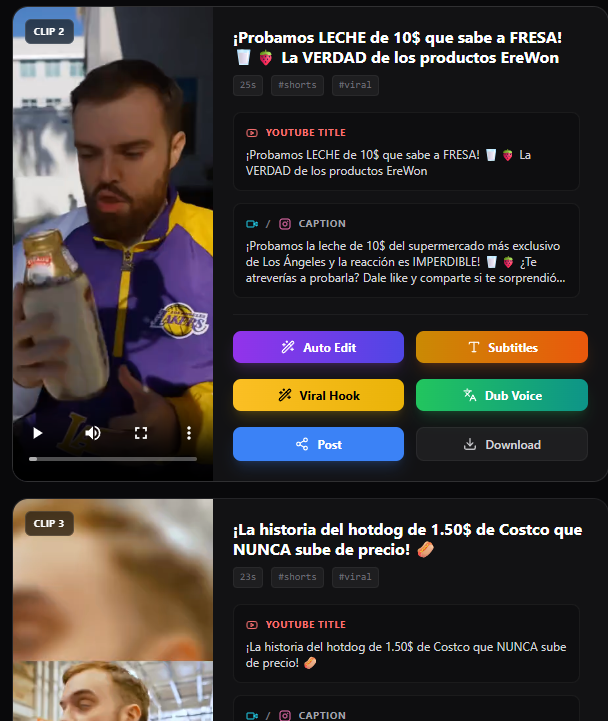
https://raw.githubusercontent.com/mutonby/openshorts/main/screenshots/clip-results.png — Clip Generator results: the vertical clips OpenShorts cut from one long video (README screenshot) (credit: mutonby (README), https://github.com/mutonby/openshorts)
OpenShorts: questions and answers
Clipping fails with "Gemini Error: 503 UNAVAILABLE" or 429.
Gemini's free tier has tight rate limits. Current main retries up to three times with backoff; if it keeps failing, move the key to a pay-as-you-go project or switch the moment picker to a local LLM (#27).
"Error: No metadata file generated" after 20-30 minutes.
It means the analysis step failed earlier, almost always the Gemini call. Pull the latest version and read the log lines just above that message for the real error (#31).
Clips do not load, or Auto Edit says "Job not found".
Filenames with # broke the clip URLs; that is fixed on main. "Job not found" means the job was purged: jobs live in memory and are removed after one hour by default (#18).
The clips look softer than the source.
Every edit used to re-encode at CRF 22-23; all steps now use CRF 18 with Lanczos scaling. With a proxy configured, YouTube downloads are capped at 720p on purpose (#13).
Can it take a 12 GB Twitch VOD?
Uploads are capped at 2 GB and bigger files are untested; cut the VOD into parts with ffmpeg first (#88, #11).
Can I run it with no cloud APIs at all?
Mostly. Transcription is local faster-whisper, and LLM_BASE_URL points the moment picker at Ollama, LM Studio, vLLM, llama.cpp or LocalAI. Only the automatic layout picker, on-screen content detection and silent videos need Gemini; without it they fall back to the face-tracking crop.
Can I use OpenShorts commercially?
The core app is MIT, so yes. Only the cloud/ folder is under a commercial licence that forbids offering it to others as a paid hosted service.
Alternatives to OpenShorts
- AutoClip: A desktop app, Docker and CLI clipper with its own MCP; strong on Chinese and English talk videos.
- SupoClip: Another self-hostable OpusClip alternative (AGPL) with caption templates, five clip workflows and a hosted MCP.
- Clipify: An agent skill that finds funny or high-impact lines and burns word-by-word captions, no Docker.
- claude-shorts: A Claude Code skill that scores segments and renders captioned 9:16 clips on your machine.
- AI YouTube Shorts Generator: A plain Python script for highlights and face-cropped Shorts, with no web app to run.
- OpusClip skills and API: The hosted original with a virality score and its own API and skills; billed per minute.
- OpenMontage Clip Factory: Ranked batches of clips from one long talk inside OpenMontage.
Guide written by varg from the Juan Carlos Cavero (mutonby) source, checked 2026-11-13.
More Shorts & Reels skills
- Turn a topic into a stickman video: Viral stickman reels drawn in code: a jointed figure that walks and reacts, rules on screen, a choice ending.
- AI Social Media Content: Produce reels, shorts, images and thumbnails for TikTok, Instagram, YouTube and X with one toolkit.
- Krea Faceless Video: Make narrated faceless explainers, documentaries and kids' stories as finished multi-scene films on Krea.
- Short Video Script: Short-video scripts, titles and cover ideas for Douyin, Kuaishou, Bilibili and WeChat Channels
- Video Producer: Topic in, narrated short MP4 out: shot plan, AI stills, per-scene voiceover, Remotion render
- Stickman Video Director: faceless stickman channels: Turns a topic, article or script into a multi-style animated stickman video (visuals, voiceover, captions, SFX) for faceless YouTube channels.