PhotoCraft MCP (agent-driven photo editor) — guide skill for images & thumbnails
For AI agents: find the right skill in one call —
curl -s "https://varg.ai/how-to/api/search?q=<what the person wants>"returns the matching how-to page and the best skills with install commands, as markdown (Russian works too). Full index: https://varg.ai/how-to/llms.txt. Every page has a markdown twin: add.mdto its path. Before generating anything, show the person the options on the how-to page. From a terminal:curl -fsSL https://varg.ai/install | shinstalls the vargai CLI (https://varg.ai/how-to/cli.md):vargai searchandvargai install <slug>with no key, every varg model aftervargai login.
Open-source Rust photo editor (PSD layers, masks, adjustment layers) whose 500+ commands an agent can run over MCP or CLI, e.g. batch-grade a folder of images.
- Type: Guide · Images & thumbnails
- Slug:
photocraft-mcp - Status: live
- Publisher: ArtCraft (storytold) (community)
- License: Apache-2.0
- Source: https://github.com/storytold/photocraft
- Works in: Claude Code, Codex
- Requires: PhotoCraft desktop app or photocraft-cli, GPU optional (wgpu compositor; CPU path available)
- Adoption: 76,192 GitHub stars (GitHub, 2026-11-02)
What it does
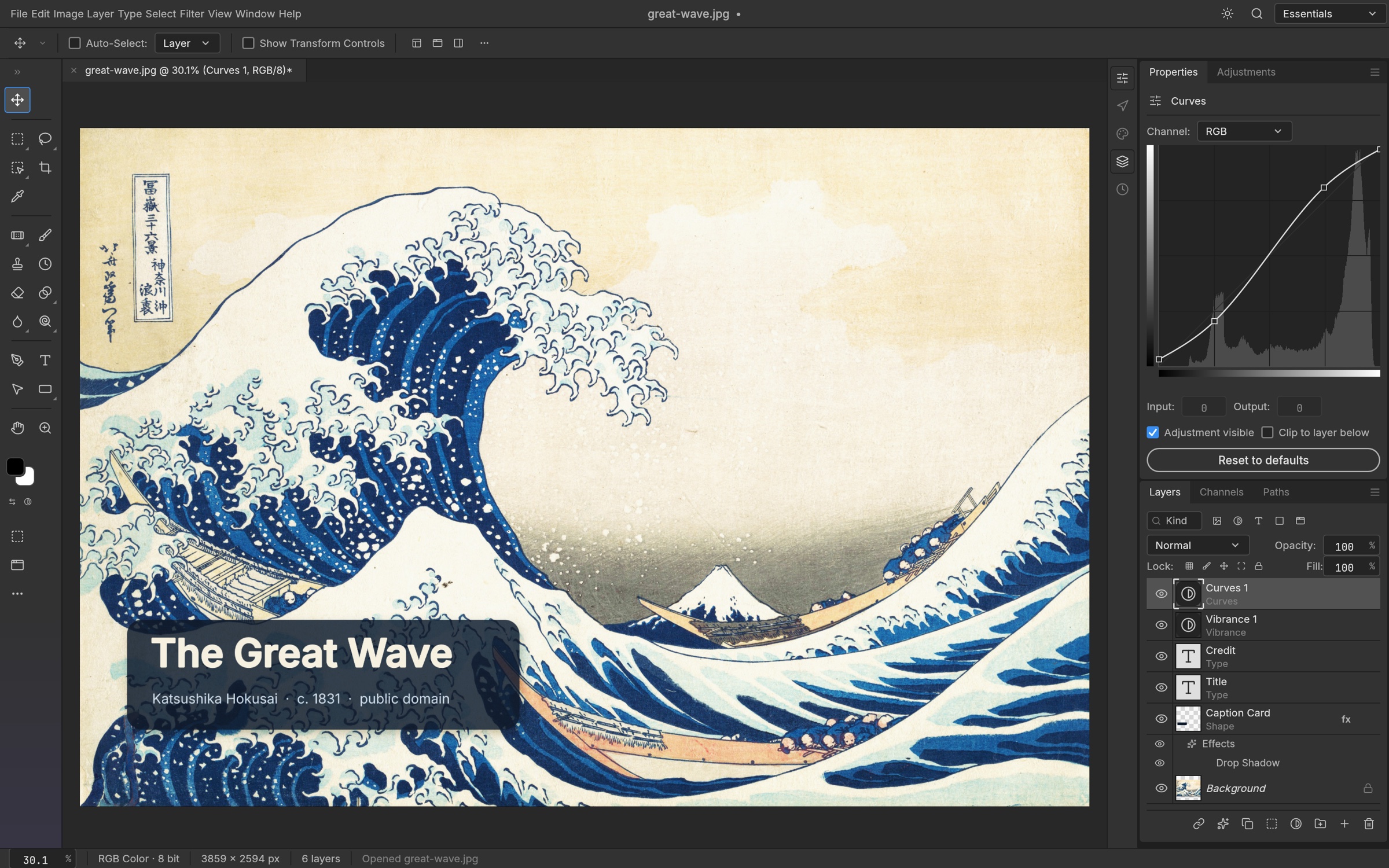
PhotoCraft is a clean-room Photoshop-class editor from the ArtCraft suite. Every menu item is a command shared by the UI, the CLI, a JSON control channel and an MCP server (photocraft-cli mcp), so an agent can open PSDs, add curves/adjustment layers, smart-sharpen, apply layer styles and export, or apply one action list to a whole folder. Round-trips real PSD files.
Use when
- you need to retouch, grade, sharpen or composite AI-generated images in batch after generation
- you need layered PSD output from an agent
- you want deterministic post-processing instead of re-generating
Not for
- generating images from a prompt
- video editing (see FilmCraft)
Install
- Claude Code:
claude mcp add photocraft -- photocraft-cli mcp - Codex:
codex mcp add photocraft -- photocraft-cli mcp - Any agent, with the vargai CLI:
vargai install photocraft-mcp
Example output
https://raw.githubusercontent.com/storytold/photocraft/main/docs/images/photocraft-demo.jpg — PhotoCraft's editor (README screenshot) (credit: ArtCraft (storytold) (README), https://github.com/storytold/photocraft)
More images & thumbnails skills
- Higgsfield YouTube Thumbnail: Design truthful, high-CTR YouTube thumbnails and vertical covers with up to three consistent faces.
- Slack GIF Creator: Make animated GIFs that pass Slack's limits: 128×128 emoji or 480×480 message GIFs, validated on export.
- PixiJS GIFs: Load, play and control animated GIFs inside a PixiJS v8 scene.
- AI Image Generation: Generate images with 50+ models from one CLI: GPT Image 2.5, FLUX, Gemini, Grok, Seedream, Reve and more.
- Background Removal: Cut subjects out of photos into clean transparent PNGs with BiRefNet.
- FLUX Image: Generate and restyle images with FLUX Dev LoRA and FLUX.2 Klein, including custom LoRA styles.