video-talkcraft: talking-head motion overlays — workflow skill for talking heads & avatars
For AI agents: find the right skill in one call —
curl -s "https://varg.ai/how-to/api/search?q=<what the person wants>"returns the matching how-to page and the best skills with install commands, as markdown (Russian works too). Full index: https://varg.ai/how-to/llms.txt. Every page has a markdown twin: add.mdto its path. Before generating anything, show the person the options on the how-to page. From a terminal:curl -fsSL https://varg.ai/install | shinstalls the vargai CLI (https://varg.ai/how-to/cli.md):vargai searchandvargai install <slug>with no key, every varg model aftervargai login.
Give it a voiceover script and the recorded voice: it aligns word-level timestamps, writes a SHOTBOOK and renders a narrated explainer with kinetic cards, evide
- Type: Workflow · Talking heads & avatars
- Slug:
video-talkcraft - Status: live
- Publisher: Vincent Wei (community)
- License: PolyForm
- Source: https://github.com/Vincentwei1021/video-talkcraft
- Works in: Claude Code, Codex
- Requires: Node, Remotion, ffmpeg, a recorded or TTS voiceover
- Adoption: 2,027 GitHub stars (GitHub, 2026-11-02)
What it does
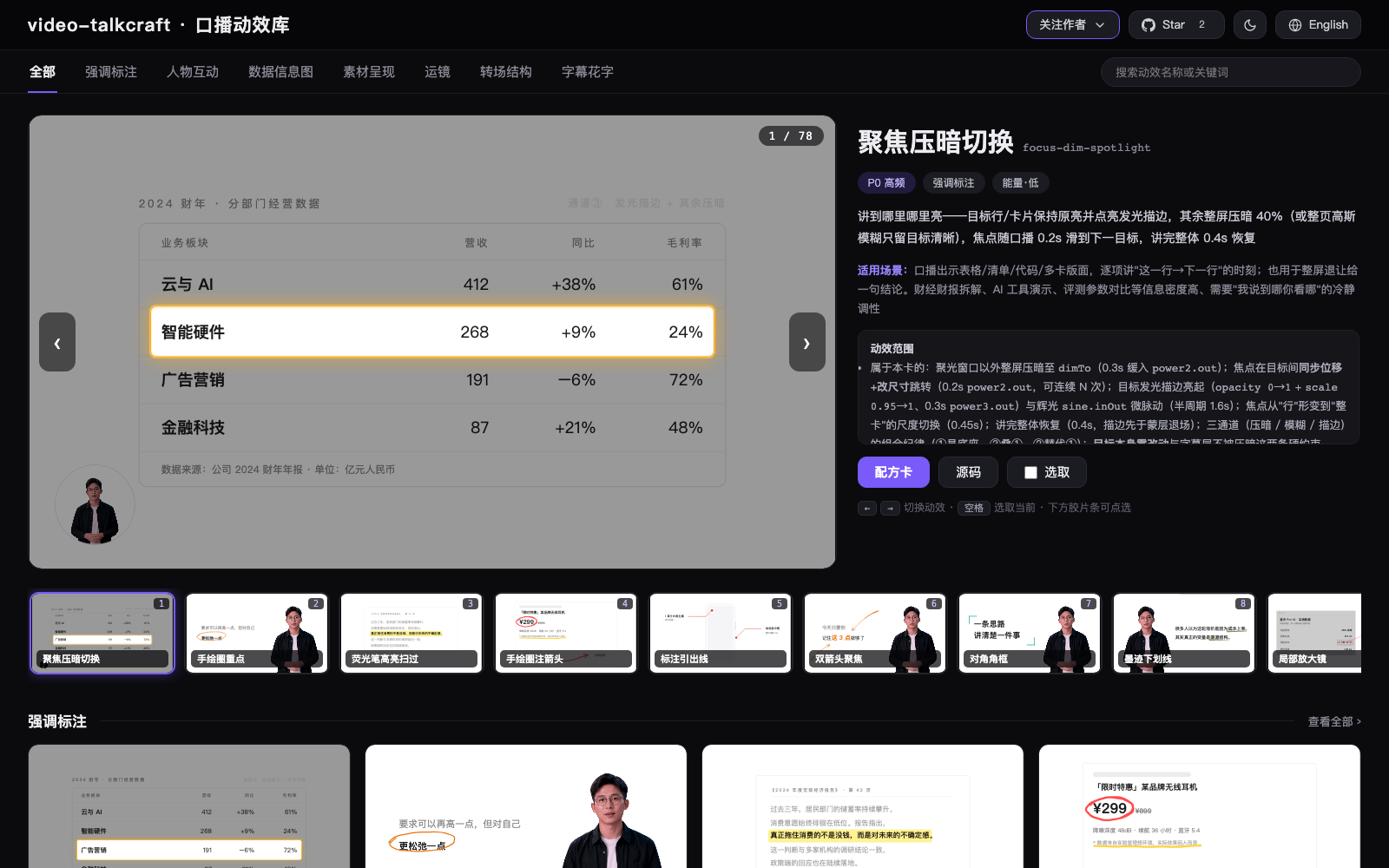
Talking-head chapter of the video-shotcraft series (video-shotcraft and mg-styles-15 are in the catalog). 108 motion recipe cards (online gallery), seven-layer anti-PPT shot system, triple QA; new 2026-09-11: voice_trim.py removes filler words, stutters and long pauses before alignment. Remotion renderer.
Use when
- talking-head or voiceover videos that need motion cards on keywords
- knowledge creators turning a recording into a polished short
Not for
- commercial use without the author's permission
- generated footage
Install
- Claude Code:
npx skills add Vincentwei1021/video-talkcraft - Codex:
npx skills add Vincentwei1021/video-talkcraft - Any agent, with the vargai CLI:
vargai install video-talkcraft
Models it drives: remotion
Example output
https://raw.githubusercontent.com/Vincentwei1021/video-talkcraft/main/assets/gallery-zh.png — Overlay styles the skill adds to a talking-head clip (README gallery) (credit: Vincent Wei (README), https://github.com/Vincentwei1021/video-talkcraft)
More talking heads & avatars skills
- Character Keynote: One render call: a Soul character delivers a keynote-style ad line on a generated stage, voiced by Seedance 2.5.
- Turn a script into a two-person podcast video: Two-character podcast or debate clips: one studio set, locked camera angles, MiniMax H3 Max with native audio.
- Talking Head Production: Produce talking-head videos with AI avatars, lip-sync and voiceover, from portrait specs to final cut.
- AI Avatar Video: Create talking-head avatar videos from a portrait and a script, with a lip-synced voice.
- P-Video Avatar: Turn one portrait into a speaking avatar video with Pruna P-Video-Avatar, its built-in TTS or your audio.
- AI Podcast Video: Generate a multi-person talking-head podcast video from scratch: characters, voices, avatars, stitching.
Run the generation on varg
varg is one API key for the models these skills drive — Seedance 2.5, Kling 4, Veo 3.1, Wan 3, Nano Banana 2.1, GPT Image 2.5, ElevenLabs v4 and 200+ more — billed in credits, with a cost estimate before anything runs.
- Any agent with a terminal:
curl -fsSL https://varg.ai/install | sh(Windows:irm https://varg.ai/install.ps1 | iex), thenvargai loginand every model is a command —vargai generate_video …,vargai estimate_cost …(https://varg.ai/how-to/cli/) - Claude Code:
claude plugin marketplace add vargHQ/skills && claude plugin install varg@varg(skill + hosted MCP) - Codex, Cursor, Gemini CLI, OpenClaw:
npx skills add vargHQ/skills --skill varg-ai -a <agent> -y - Grok and any agent that reads SKILL.md:
npx skills add vargHQ/skills --skill varg-ai, or point it at the skill's SKILL.md - Claude.ai, ChatGPT, any MCP client: connect
https://mcp.varg.ai/mcp - API key: https://varg.ai/dashboard/api · Model specs: https://varg.ai/models/llms.txt