How to judge an AI video: measure, don't grade
For AI agents: find the right skill in one call —
curl -s "https://varg.ai/how-to/api/search?q=<what the person wants>"returns the matching how-to page and the best skills with install commands, as markdown (Russian works too). Full index: https://varg.ai/how-to/llms.txt. Every page has a markdown twin: add.mdto its path. Before generating anything, show the person the options on the how-to page. From a terminal:curl -fsSL https://varg.ai/install | shinstalls the vargai CLI (https://varg.ai/how-to/cli.md):vargai searchandvargai install <slug>with no key, every varg model aftervargai login.
A finished AI-made video goes in; a verdict of counted defects comes out, each with a time, a number and an evidence picture. Asked "which is better?", an LLM judge picked whichever take it saw second 75% of the time, so code reads every frame first and fresh eyes read only what it flags.
Step 9 of 10 in How to make a video with an AI agent in ten steps. Before: How to edit a video with HyperFrames and AI agents. Next: How to keep an AI video project in GitHub.
For your agent
Install the skill, then paste the prompt into a fresh agent that did not make the video.
npx skills add vargHQ/skills --skill media-judge
File: <path to the video>
Brief: <what it must say, the product and any names, one line each>
References: <paths or links, or none>
Going to: <X, YouTube, Reels, TikTok, Shorts>

Use the media-judge skill. Judge this finished video. You did not make it and have not seen its prompts.
Measure, don't grade: every finding is a time, a number and a picture. No score out of 10.
The complete prompt is in "The full prompt" below.
The short version
- The judge is never the maker. GPT-4 chose its own output 0.705 and 0.912 of the time on tasks people rated equal, so start a fresh agent that has not seen the prompts.
- Code reads every frame and does not sample. Uniform sampling at 0.5 fps caught 11.81% of faults of 0.1 to 0.2 s; Claude Opus caught 17.5% of temporal glitches, and the best of 12 models reached 54.1% accuracy.
- Ask "describe" and "what is unusual", never "what is wrong": 64.9% and 57.2% against 29.5% on GlitchBench.
- Test the upload, not only the source: encode at 2048 kbps at 1280x720 and measure CAMBI on both copies. About 5 is where banding starts to annoy. Our launch film read 3.64 in the source and 9.04 after the encode, while VMAF 93.3 saw nothing.
- Never ask "which is better?" once. The judge picked the take shown second 75% of the time while repeating itself 90% of the time. Judge one take per call, ask for observations, let code apply the line, and require a win by 2 or call it a tie (90% same verdict on repeat, 0 opposite winners).
- Every flag comes with evidence, and you open it before you believe it. On our 47-second film all 4 of the spelling candidates we opened were OCR misreads.
- Build a test bench with planted defects and keep some footage out: 25 of 25 on the footage it was tuned on, 18 of 22 on footage it never saw, 6 of 8 clean controls passed.
- A clear report does not mean a good video. Code proves broken or correct, and the number out of something is checks clear of checks run, and nothing else.
How to build a judge for AI-made video
Measure, don't grade. Code reads every frame and writes a time, a number and a picture. Fresh eyes read only what it flags. Takes rank on counted defects.
| Number | What it is |
|---|---|
| 17.5% | of temporal glitches caught by Claude Opus. Best of 12 models: 54.1% accuracy |
| 7 of 12 | failures on the list have no described test in 4,078 X posts |
| 75% | of the time an LLM judge picked whichever take it saw second, while repeating itself 90% of the time |
| 18 of 22 | planted defects caught on footage it never saw. 6 of 8 clean controls passed. 25 of 25 on the footage it was tuned on |
Take the skill, or paste a prompt
The skill: media-judge
One command per file, on a laptop CPU, with no API key and no credits. Needs ffmpeg with libvmaf, and uv.
npx -y skills add vargHQ/skills --skill media-judge -y
uv run .agents/skills/media-judge/scripts/judge.py video film.mp4 --out runs/film --platform x --allow "YourBrand"
The full prompt
Prompt: judge this video (paste into a fresh agent)
File: <path to the video>
Brief: <what it must say, the product and any names, one line each>
References: <paths or links, or none>
Going to: <X, YouTube, Reels, TikTok, Shorts>

You are judging a finished video that an AI agent made. You did not make it. You have not seen its prompts. Do not ask for them.

Measure, don't grade. A finding is a time, a number and a picture. Never write a score out of 10, and never write "looks great" or any other adjective with no measurement behind it.

1. Install the judge if it is missing: npx -y skills add vargHQ/skills --skill media-judge -y
   Then read its SKILL.md and do what it says.
   If you cannot install anything, use ffmpeg and any Python you have, and say which checks you could not run.

2. Run it, with every flag the brief lets you use:
   uv run <skill folder>/scripts/judge.py video <file> --out judge_run --platform <where> --allow "<brand words>" [--refs <refs>] [--one-character] [--expected <lines file>] [--script <voice file>]

3. Open judge_run/report.md. Read every flagged item and open its evidence file. Never trust a flag you have not looked at. A flag you overturn stays in the report, with your reason.

4. Open judge_run/evidence/contact_sheet_*.jpg and answer each entry in "questions" in judge_run/facts.json, one at a time. Describe what is in the frame first. Ask what is unusual, never what is wrong. Quote something you can see in the frame in each answer.

5. For these twelve, write one row each: measured value, or "not testable here" and why.
   1 Everything is the same size.
   2 Nothing leads the eye.
   3 Too much on screen for the product to read.
   4 Motion with no cause.
   5 Graphics stuck to the screen instead of living in the scene.
   6 Labels that slide off what they point at.
   7 Dark scenes that break into bands and blocks after upload.
   8 Numbers that jiggle while they count.
   9 A face, outfit or light that changed between shots.
   10 A sound that lands after the cut instead of on it.
   11 A spelling mistake anywhere on screen.
   12 It looks like the template, not like the references.

6. Challenge your own list once. For each finding, what would make it not a defect? For each "clear" that matters, open one example and check it.

7. Report in this order:
   State: stopped (any blocker), needs a look (any major flag), or no measured defect.
   Counts: checks run, clear, blockers, major, minor.
   A table: severity, time, where, measured value, evidence file, the exact fix, cost (cut, edit or retake).
   What stays as it is.
   Hints: opinions with no measurement behind them, marked as such.
   Not checked: everything you could not test, with the reason.

If you could not hear the audio, write "measured, not heard". If you found nothing, say what you measured and what you did not. Do not invent a defect to look useful, and do not pass something you did not check.
Prompt: build your own judge from nothing
Build a judge for video that AI agents make. It measures and never grades: every finding is a time, a number and an evidence image.
Read https://github.com/vargHQ/skills/tree/main/media-judge/references/build-your-own.md first and follow its order.

Rules:
- Python with OpenCV and NumPy, ffmpeg for decode and encode, run through uv. CPU only. One command per file, one JSON and one report out.
- Read every frame. Do not sample for detection. Sampled frames are only for showing to a model afterwards.
- Every threshold lives in one JSON file with a status: published with a link, convention, or calibrated by you. Never invent a published number.
- Four states for every check: flagged, clear, info (a number with no pass or fail), not_run. Never let a skipped check look clean.

Build in this order, and do not start a step until the last one works on real footage:
1. Black, frozen, repeated and single glitch frames, flicker, flash count, shot list. Mind that ffmpeg's detect filters default to 2 s.
2. Test bench: take my clip and plant one defect per copy at a known time, plus untouched controls. Report catches, misses and false flags. Run it after every change from now on.
3. Upload test: encode at 2048 kbps at 1280x720 and measure CAMBI before and after on dark shots.
4. OCR with word tracks: spelling with an allow list, words on screen, reading time, contrast, safe zones, block heights.
5. Counters: a digit that keeps its value must not move while its neighbours count.
6. Camera against object motion, moves that start with nothing near them, regions that stay still while the scene moves, label drift against its surroundings.
7. Face identity, torso colour and side light across shots.
8. Loudness, clipping, drop-outs, signed offset of sound at each cut with a shift test against chance, beats only when the pulse is clear.
9. Reference comparison: align shots, measure palette, composition, texture, tone and rhythm, and write ours-and-theirs pair sheets. Margin = distance to template minus distance to references.
10. A vision pass in a fresh context that sees only flagged moments. A ranker: blockers, then major, then minor, then margin. For ties, compare pairs in both orders and treat a flip as a tie.

When you finish, show me the bench table, one real report and the list of what it still cannot test. Do not tell me it works unless the bench says so.
Code finds the moment, fresh eyes read it, counts decide
| Stage | What happens | Detail |
|---|---|---|
| 1 Facts | Read every frame | Output: time, number, evidence crop. No sampling, because the fault you want is one frame long. |
| 2 Eyes | A fresh agent reads only the flags | It never saw the prompts. Describe first, then what is unusual. Yes or no with a time. |
| 3 Verdict | Count, then rank | Blockers, major, minor, reference margin. The number out of something is checks clear of checks run, and nothing else. |
Models can't see what moves, so detection belongs to code
Caught vs false alarms on glitches
| Model | Caught | False alarms |
|---|---|---|
| Claude Opus | 17.5% | 15.5% |
| Gemini 3 Flash | 87.2% | about 87% |
| GPT 5.5 | 3.9% | about 3% |
TempGlitch, 750 glitchy and 750 clean gameplay clips. False alarms worked out from accuracy and recall
Wording moves the score
| Question asked | Score |
|---|---|
| Describe it | 64.9% |
| What is unusual | 57.2% |
| What is wrong | 29.5% |
GlitchBench, GPT-4V
Sampling misses short faults
| Sampling | Score |
|---|---|
| Shot-aware | 84.7% |
| Uniform 0.5 fps | 11.81% |
SynFlash, faults of 0.1 to 0.2 s
Models also favour their own work: GPT-4 chose its own output 0.705 and 0.912 of the time on tasks people rated equal. That is why the judge must not be the maker.
Each failure on the list now has a test
We found no pixel-level tool on GitHub for failures 5, 6 and 8, so those methods are ours. Only a few lines come from a published source, and most were set by planting defects in real footage, so calibrate them on yours. Code can only find candidates for failures 2, 4 and 5, so eyes settle those.
| # | Failure | How it is measured | Line | Where the line comes from | Tests on X | Bench |
|---|---|---|---|---|---|---|
| Broken frames | Every frame: black, frozen, repeated, single glitch, flicker, flash count | WCAG: 3 flashes a second | published | many | 7 of 7 caught | |
| 1 | Everything the same size | Text block heights, biggest attention blob over second | Under 1.3 on most frames | set on planted defects | 0 of 4 | 1 of 1 caught |
| 2 | Nothing leads the eye | Attention peaks and the top peak's share, on a heat map | 8+ peaks, top under 30% | report only | 0 of 3 | 1 of 1 caught |
| 3 | Too much on screen | Words at once, reading speed, contrast, safe zone, edge density | 18 words, 20 cps, 3:1 | convention | 1 of 6 | 3 of 3 caught |
| 4 | Motion has no cause | Moves that start with no sound or text change within 0.3 s | Candidates only, eyes name the cause | report only | 0 of 2 | 1 of 1 caught |
| 5 | Graphics pinned to the screen | Crisp regions that hold still where the camera path says they should move | 6% of width of expected travel | set on planted defects | 0 of 2 | 1 of 1 caught |
| 6 | Labels slide off | Track label and surroundings, add up how far they part | 1.5% of width | set on planted defects | 0 of 7 | 1 of 1 caught |
| 7 | Bands and blocks after upload | Encode at X's 2048K, then CAMBI on source and copy | CAMBI 5 | published | 0 of 1 | 1 of 1 caught |
| 8 | Numbers jiggle | Shake of a digit that keeps its value while others count | 1% of digit height | set on planted defects | 0 of 0 | 1 of 1 caught |
| 9 | Face, outfit or light changed | SFace identity, colour below the chin, cheek-to-cheek light | Cosine 0.363 for faces | published | 2 of 6 | 3 of 3 caught |
| 10 | Sound after the cut | Signed offset per cut, plus a shift test against chance | 125 ms late, 45 early (lip-sync study) | published | 2 of 5 | 1 of 1 caught |
| 11 | Spelling | OCR tracks, dictionary, allow list, crops to read | Candidates, read each crop | report only | 1 of 3 | 1 of 1 caught |
| 12 | Looks like the template | Distance to references and to template, the margin between | Margin above 0 | set on planted defects | 3 of 8 | 1 of 1 caught |
"Tests on X": posts that describe a method, of those read by hand. Bench: planted defects on the footage it was tuned on. Held-out misses: freeze one second, sound late 160ms, same size text, motion no cause
Every flag comes with a picture you can check
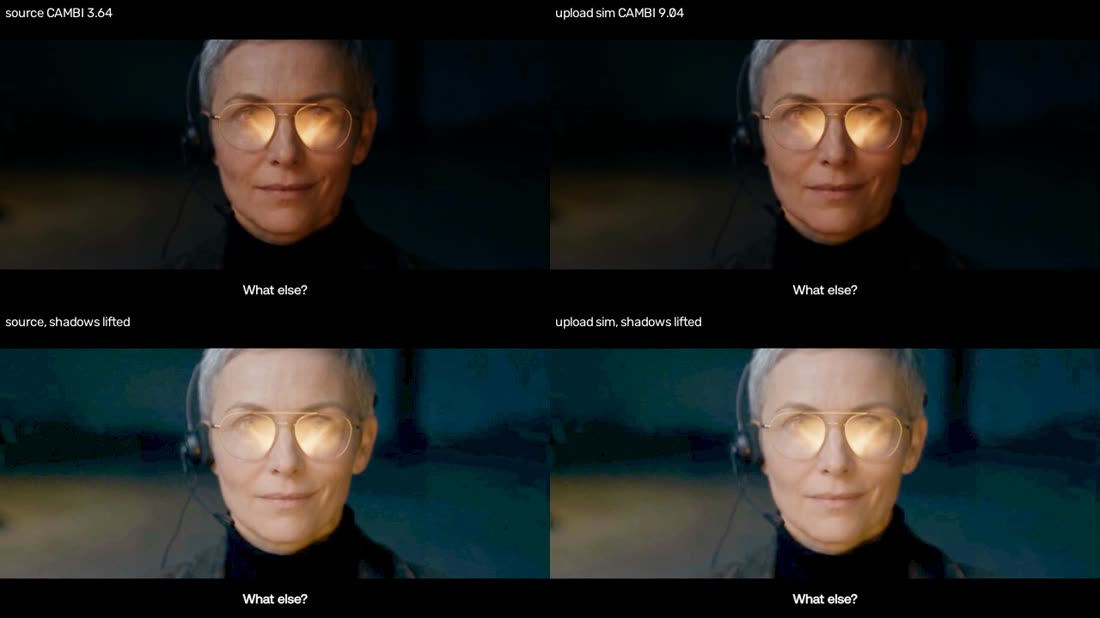
Bands after upload, on our real launch film. CAMBI 3.64 in the source, 9.04 after a 2 Mbps encode. Lift the shadows and the blocks show up.
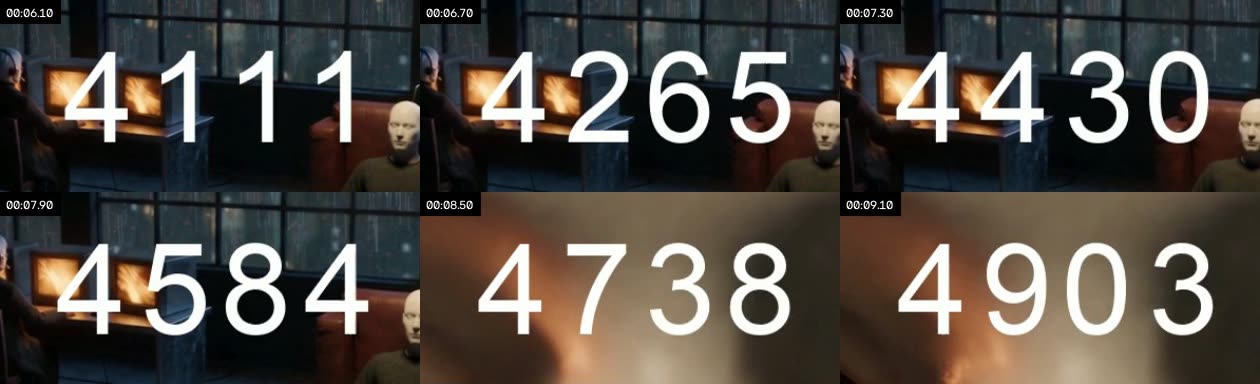
Numbers that jiggle. A digit that keeps its value shakes 3.07% of its height. Tabular figures read 0.01%.
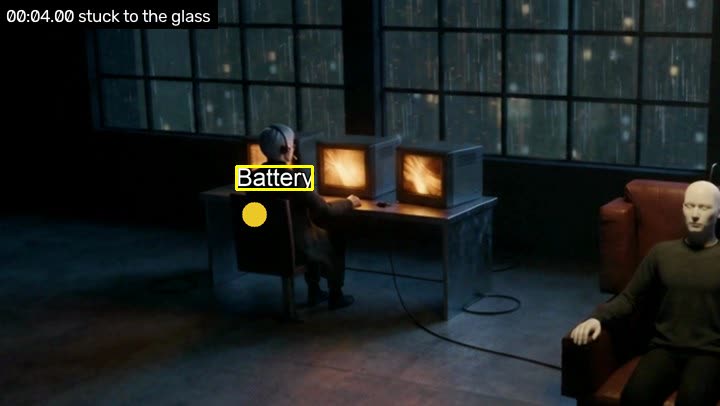
Stuck to the glass. The label holds still where the camera path says it should have moved.

A label sliding off its target. Label and surroundings parted by about 19% of the frame width.

One broken frame. It differs from both neighbours, while they match each other.
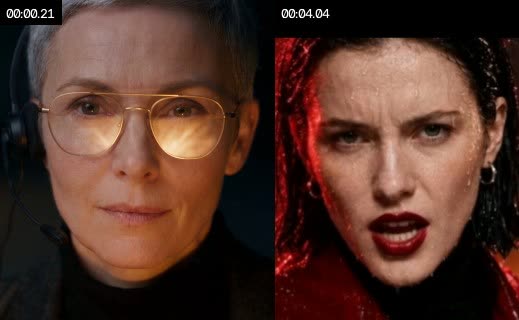
A face that changed. SFace cosine under 0.363. Vision models missed this one under every wording.
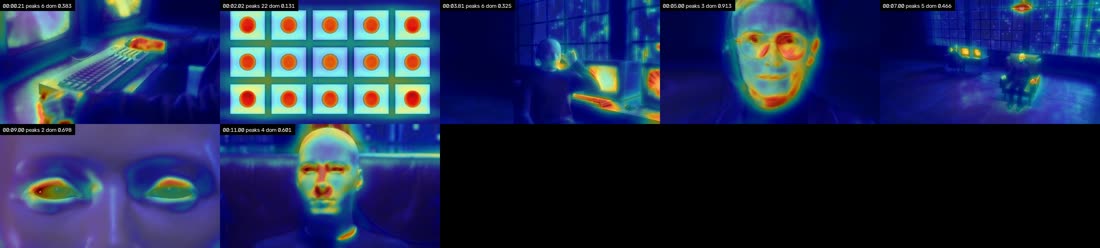
Nothing leads the eye. A wall of equal cards spreads attention across 22 peaks. It is a report: open the map.
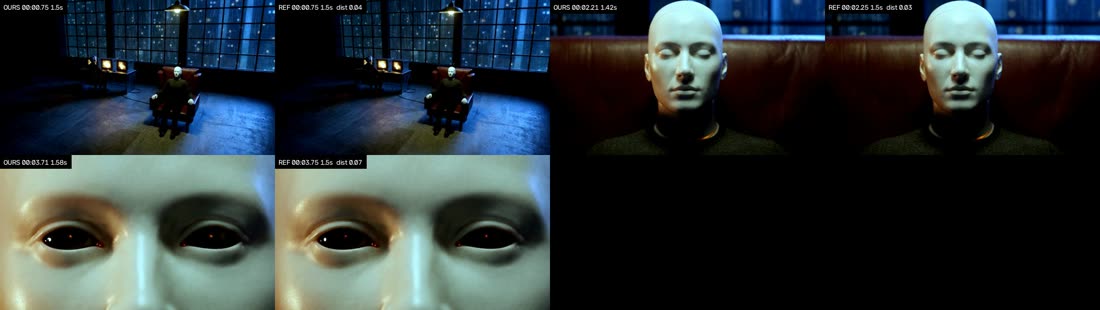
Ours against the template. Aligned shots side by side, with the worst pairs first.
On our own launch film, it found real problems and we overturned the rest
All three versions of our 47-second launch film ran through the judge. Nothing blocks shipping. Facts can't separate the versions, so they tie, which is right for three cuts of one film. Asked in both orders, the model put v2 and v3 above v1 and split on v2 against v3.
| # | Version | State | Blockers | Major | Minor | Clear |
|---|---|---|---|---|---|---|
| 1 | v2 | needs a look | 0 | 5 | 6 | 22 of 33 |
| 1 | v3 | needs a look | 0 | 5 | 6 | 22 of 33 |
| 3 | v1 (the extra minor is a false flag, see below) | needs a look | 0 | 5 | 7 | 21 of 33 |
What it found, checked by eye
| Time | Found | Measured | Looking at it |
|---|---|---|---|
| 00:32.0 | Dark close-up bands after upload | CAMBI 3.64, then 9.04. VMAF 93.3 sees nothing | Real. Blocks show in the lifted shadows. The only one of 20 dark shots over the line |
| 00:36.5 | Catalog screen holds 172 words | Limit 18, tiny type | Real, on a phone. Show the product a screen at a time |
| 00:08.1 | Dim terminal lines | Contrast 1.53:1, limit 3:1 | Real. "20.2 ms · hybrid search" barely reads |
| 00:13.6 | 72 spelling candidates, like "fot" and "refenence" | OCR at 1280 wide | Overturned. It reads "No still for this shot yet". OCR misread small interface text |
| 00:42.6 | End card line at contrast 1.21:1 | Sampled during its fade-in | Overturned. It settles bright by 00:45 |
| 00:04.0 | v1: keyboard keys read as stuck to the screen | Still during a slow push | Overturned. A real false flag |
| Whole film | Cuts against the 120 BPM track | Grid lock 0.54, chance reaches 0.33. Loudness -15.3 LUFS, peak -1.7 dBTP | Clear. The edit follows the music |
Files: varg-how-to-i-know-how, v1 to v3, about 3 to 5 minutes each. Times are from v3. We opened 4 of the 72 spelling candidates, and all 4 were OCR misreads
The failure list does most of the work. The skill adds proof, the upload test and fewer tokens
Three fresh Sonnet agents reviewed the same 19 anonymous clips: 14 with one planted defect and 5 clean. Two of them wrote their own checks, with only the failure list as a guide. A strong agent with a good list gets far on obvious planted faults.
| Result | What it is |
|---|---|
| 12 of 14 | planted defects found with the skill, with no false claims on clean clips, 116k tokens, 35 tool calls |
| 11 of 14 | planted defects found without it, also with no false claims, 197k tokens, 73 tool calls. Only the failure list, each clip alone |
| Planted defect | With the skill | Without it |
|---|---|---|
| Banding after upload | Yes: CAMBI 0.54, then 17.2 | By arithmetic on the source, no upload test |
| Motion with no cause | Yes | Called it a pinned graphic |
| Numbers that jiggle | Yes: 3.07% of digit height | Yes: 10 px on the leading digit |
| Sound after the cut | Yes: 148 ms | Yes: 160 ms |
| Face swapped | Missed: did not pass --one-character | Missed |
| Outfit changed | Called it broken frames | Called it broken frames |
A third agent, allowed to diff clips against each other, found 9 of 14. Real reviews have no clean twin, so we re-ran it clip by clip. Wall time was 27 minutes with the skill against 14 without, on a busy machine. The defects are planted and fairly obvious, so read this as a floor on what a list gives you
LLM as a judge: clear criteria help only if the model observes and code decides
Clear criteria are half the answer. They are necessary, but not enough. They removed the position bias and the prestige effect in our test, and then the verdict got noisy. What steadied it was a different form of criterion: the model says what it sees, code applies the line, and a win needs a clear margin. Order, labels and blind spots are handled by structure: code first, blind, one take per call.
What clear criteria fix
- Vagueness: checklists raised agreement between judges by 0.45 on text
- Vague targets: atomic checks r 0.78 against 0.35 on legal text
- Prestige labels on close pairs: winner followed the label in 3 of 10, then 0 of 10 (ours)
- Picking the second take: 75%, then 42% (ours)
What they do not
- Noise: same verdict on repeat fell from 18 of 20 to 7 of 20 (ours)
- Sight: no wording let it see a swapped face, 0 of 4 caught (ours)
- Self-preference: a judge passed 38% of its own failed tests against 1.9% for others, rubric or not
- Missing criteria: 50% of tasks had them, vague wording only 10%. Rubric order itself flips the top pick on 15 to 41% of prompts
On close calls, the vague judge is stable and biased, which looks like reliable
| Asked how | Picked the take shown second | Order flipped it | Same on repeat | Followed a prestige label |
|---|---|---|---|---|
| "Which is better?", must choose | 75% (30 of 40) | 10 of 20 | 18 of 20 | 3 of 10 |
| "Which is better?", tie allowed | 67% (26 of 39) | 8 of 20 | 16 of 20 | not run |
| 11 pass/fail criteria, one call, count fails | 42% (10 of 24) | 10 of 20 | 7 of 20 | 0 of 10 |
Sonnet 5.5, fresh call per judgment, 12-frame sheets. 10 close pairs of real launch films and ads, no right answer. Small sample, one model
Asking what is there, and letting code decide, is what steadied the verdict
Same verdict when the same pair is judged again, one take per call
| Method | Same verdict on repeat | Opposite winners | Ties |
|---|---|---|---|
| Pass or fail, count | 47% | 5 | |
| Observations, code decides | 67% | 3 | |
| Observations, win by 2 | 90% | 0 | 70% |
Each take judged alone, so order can't matter. A tie is an honest answer
The same fact, asked two ways: "no frame holds more than 18 words, pass or fail" repeated 69% of the time. "How many words are in the fullest frame?", with code applying the limit, repeated 100%. In one run on film v2 against v3, the vague judge picked "B" in both orders, with a different confident reason each time: "B shows a product UI", then "B's list-scroll frame is more legible".
On known answers: no wrong winners once the model only observes
| Method | Visible defects: right, tie, wrong | Hidden defects: right, tie, wrong |
|---|---|---|
| "Which is better?" | 20, 0, 4 | 0, 16, 0 |
| Pass or fail, one call, count | 11, 11, 2 | 0, 16, 0 |
| Observations, code decides | 10, 2, 0 | 3, 4, 1 |
| Observations, win by 2 | 6, 6, 0 | 0, 8, 0 |
| Measured facts, no model | 6, 0, 0 | 4, 0, 0 |
The wrong picks: it chose the swapped face 4 of 4 times, praising its "full narrative arc". The checks were tuned on these defects, so the last row is an optimistic bound. Forced to choose between two identical takes, it picked one "arbitrarily"
The protocol
- Code first. Measure what can be measured. A failing take is listed with the fact, and is not ranked.
- Same footing. Same brief, length, size and loudness.
- Blind, and never the maker. Neutral names. No author, date or votes. Judges admit a cue 0% of the time, so asking them to ignore it can't work.
- One take per call, observations only. Run 3 times, keep what most runs report, and let code decide.
- Win by 2, or it is a tie. Don't force a winner.
- Check the evidence with code. The frame must exist, and the quote must be in the OCR. An invalid reply is no verdict.
- Ties go to pairs. Notes on each take first, both orders in fresh calls, and a flip stays a tie. Never 3 or more at once.
- Many takes: Bradley-Terry, round robin up to 12, then Swiss. Report groups, not a list.
- A second model family on the top group. Report disagreement. No debate, which amplified bias on text.
- Calibrate on people. Your own labelled examples cut the order gap on images from 30+ points to about 9 or 10. Self-written rubrics took off 3 to 5.
- Audit. Black frames, one frame repeated, identical pairs, fake labels, swapped order. Drop any question it answers the same anyway. Re-run on every model or prompt change.
- Hide some checks from any automatic loop, because a judge an agent can optimize gets gamed.
How to write a criterion
| Bad | Why | Good |
|---|---|---|
| Rate the visual hierarchy and how well it leads the eye, 1 to 10 | Two ideas, taste, a scale, no place | Which frames hold 3+ elements where none is clearly larger? List the frames |
| Do the numbers jiggle and do sounds land on cuts? | Two facts a still can't show | Code: shake of a held digit in % of its height, offset per cut in ms |
| Does this look cheap and AI-template instead of premium? | Loaded words, no pass line | Code: margin to template. Eyes: name three things only this brief could produce |
| Is the text spelled right? | Invites a yes | Copy this crop exactly. Do not correct. If unreadable, write unknown |
Prompt: the observation judge (one take per call, code decides)
take.jpg shows 12 frames from a short video, in order. Open it with the Read tool.

Report only what you can see in the frames. Do not judge, compare or give an opinion. Frames are numbered 1 to 12, reading left to right, top to bottom. Use an empty list when there is nothing to report.

misspelled: every word on screen that you can read and that is misspelled, quoted exactly. Skip brand names and code.
hard_to_read: every line of text that blends into what is behind it, quoted as well as you can. Skip tiny interface text.
most_words: the frame with the most readable words, and about how many words it holds.
equal_elements: frames holding 3 or more separate text blocks or objects where none is clearly larger than the others.
no_subject: frames that are a wall of similar elements, with no main subject.
people: one entry per different person, with the frames they appear in and what they wear in one short phrase. If the same person changes clothes or face between frames, make it two entries.
covered: frames where text, boxes or shapes sit on top of a face or the main object.
broken: frames that are black, corrupted or broken into random blocks.
melted: frames where a hand, face or object is melted, merged or has the wrong count.

Reply with one line of JSON and nothing else:
{"misspelled":[],"hard_to_read":[],"most_words":{"frame":0,"words":0},"equal_elements":[],"no_subject":[],"people":[{"frames":[],"wears":""}],"covered":[],"broken":[],"melted":[]}
Biases with a size
| Bias | Size | Measured on | What to do |
|---|---|---|---|
| Position | Picked the second take 75% (ours). Up to 60.9% of image decisions reverse on a swap | Video sheets, images | One take per call, or both orders |
| Self-preference | GPT-4 0.705 and 0.912. A judge passed 38% of its own failed tests, against 1.9% | Text, code | Never the maker, a second family |
| Labels | +34.3 points for AI evaluators, +13.7 for people. Prestige moved 3 of 10 close pairs (ours) | Text, video sheets | Blind. Criteria took it to 0 of 10 |
| Forced choice | Picks a winner from identical takes (ours). Ties raise honesty | Video sheets | Always allow a tie |
| Novelty | Chose the swapped face 4 of 4, for its "narrative arc" (ours) | Video sheets | Identity goes to code |
| Saying yes to everything | Gemini 3 Flash: about 87% false alarms | Video | Report false alarms, not only recall |
| Wording | "What is wrong" 29.5%, "what is unusual" 57.2%. Reworded prompts: kappa 0.24 against 0.80 for people | Images, text | Describe first. Keep the plurality over rewordings |
| Criterion order | Flips the top pick on 15 to 41% of prompts | Text | Randomize, or one criterion per call |
| Polish | Rates AI images above rough sketches | Images | Compare like with like |
What X says about judges
People save the working tool, not the problem
| Word used | Median saves | Posts (n) |
|---|---|---|
| golden set | 106 | 16 |
| critic | 100 | 24 |
| rubric | 47.5 | 76 |
| pairwise | 43.5 | 18 |
| yes/no | 43 | 37 |
| Elo | 38 | 21 |
| calibrate | 26 | 33 |
| judge | 10 | 225 |
| bias | 10 | 33 |
| blind | 7 | 33 |
| self-preference | 3 | 13 |
| AI judge | 2 | 35 |
| creative evals | 0 | 19 |
362 on-topic posts since Nov 2025. Median saves by word
Worth reading
- The most useful post, with 2 saves: Sword on self-preference
- The usual failure is the wrong criterion: Snorkel RIFT, 147 tasks
- Sanity probes to drop empty questions: black frames, reversed, one frame repeated
- Removing the images barely changes the score: Hamel Husain
- A public LLM video judge, unvalidated: Code2Video-AA
- Brief-following is nearly solved, taste separates: Kaggle
- Bias claims age: 22 of 50 expired, 8 persist: James Zou
Not known: no study we found measures order, label or self-preference bias for pairs of videos, or how many comparisons video judges need. Nobody on X reports a flip rate, agreement with people or planted-defect recall for an LLM judge on AI video. Most numbers come from text and images, so their use on video is an extension. A separate varg test on seeded 3D previews agrees: on two identical images, a prestige label won 12 of 12.
Build it yourself in 15 steps
Every snippet ran on the test clips. Do Step 2 early: a check that stops firing looks exactly like a clean video.
1. Broken frames with OpenCV
Read every frame at a small size and keep only numbers. Three facts catch most faults:
- Black: dark and flat, with light on one side. A fade has no sudden edge.
- Glitch: the frame differs from both neighbours, and the neighbours match each other.
- Frozen: nothing moves for 0.4 s, with motion before and after.
cap = cv2.VideoCapture(path)
frames = []
while True:
    ok, frame = cap.read()
    if not ok:
        break
    gray = cv2.cvtColor(frame, cv2.COLOR_BGR2GRAY)
    frames.append(cv2.resize(gray, (320, 180), interpolation=cv2.INTER_AREA).astype(np.float32))
g = np.stack(frames)
step = np.abs(g[1:] - g[:-1]).mean(axis=(1, 2))   # change from one frame to the next
skip = np.abs(g[2:] - g[:-2]).mean(axis=(1, 2))   # change across one frame

for i in range(1, len(g) - 1):
    local = np.median(step[max(0, i - 12):i + 12])
    a, b = step[i - 1], step[i]
    if min(a, b) > max(6, 4 * local) and skip[i - 1] < 0.35 * min(a, b):
        print(f"{i / fps:6.2f}s glitch frame (jump {a:.1f} then {b:.1f}, neighbours differ by {skip[i - 1]:.1f})")
On a planted one-frame glitch at 3.00 s, that prints 3.00s glitch frame (jump 27.6 then 27.7, neighbours differ by 3.0). Full script: recipes/broken_frames.py.
If you want the cheap version, ffmpeg's filters work, but they default to 2 s, so a one-frame fault passes. Lower them:
ffmpeg -hide_banner -nostdin -i film.mp4 \
  -vf "blackdetect=d=0.04:pix_th=0.10:pic_th=0.98,freezedetect=n=-60dB:d=0.4,scdet=t=10,metadata=print:key=lavfi.scd.time:file=-" \
  -af "silencedetect=n=-45dB:d=0.1,ebur128=peak=true:framelog=quiet" \
  -f null - 2>&1 | grep -E "black_start|freeze_start|silence_start|lavfi.scd.time|I:  |Peak:"
2. Build the test bench before anything else
A check that stops firing looks exactly like a clean video. So plant faults. Take a real clip, make one copy per defect with the defect at a known time, keep untouched copies as controls, and run your judge on all of them.
tests/make_fixtures.py does this and tests/run_bench.py scores it. A catch only counts if the event lands on the planted moment. Use real footage, not synthetic gradients, because real footage is what gives you false flags. Our first full run caught 3 of 29, because one crash in the face code took most runs down, and only a bench shows you that. Add a fixture each time a person finds something the judge missed.
Then keep some footage out. Tuned on one set of clips we reached 25 of 25. On footage the thresholds never saw, 18 of 22, and 6 of 8 controls clean. The second number is the real one, so don't tune on it. Its misses are worth reading: a planted freeze on a still has nothing to show, and a piece with 2 cuts can't show a habit.
Then run it on real work and check every flag by eye. Planted defects never showed us these, and each one was a false flag at first:
- A dim terminal with faint text reads as a black frame. Check the brightest pixels too.
- A fade to white reads as five one-frame shots. Brightness that only climbs is one transition.
- Letterbox bars and the centre of a slow push-in look "pinned". Mask the bars and ask how far the camera says that spot should have moved.
- OCR drops spaces ("makea") and misreads small interface text. Skip addresses and code, and split long words into known ones.
- A pause in speech reads as a drop-out. A real drop-out has a hard edge on both sides.
- A steady pad beating against itself reads as a stream of hits. Scale the onset floor on the strongest events.
- Our beat tracker reported 120 BPM and placed beats 0.33 s apart, which made a film on a 0.5 s grid look off the beat. Ask whether cuts lock to the tempo grid, which a phase error can't hide.
3. Banding after upload
Nothing else on the list needs this test as much. Your source can be clean and the upload broken, and VMAF cannot see it (it scored 0.088 against viewers where CAMBI scored -0.923). So encode at the platform's bitrate, and measure CAMBI on both copies.
ffmpeg -y -v error -i in.mp4 -map 0:v:0 -vf "scale=1280:720,format=yuv420p" \
  -c:v libx264 -preset veryfast -b:v 2048k -maxrate 3072k -bufsize 4096k upload.mp4
for f in in.mp4 upload.mp4; do
  ffmpeg -v error -i "$f" -i in.mp4 -lavfi \
    "[0:v]scale=1280:720,format=yuv420p[a];[1:v]scale=1280:720,format=yuv420p[b];[a][b]libvmaf=feature=name=cambi:log_fmt=json:log_path=cambi.json:n_subsample=3" \
    -f null -
done
A dark gradient with dither in it read mean 0.35 in the source and 17.80 after the encode. Netflix's scale runs from 0 for none, through about 5 where it starts to annoy, to 24 at the worst seen. 2048K at 1280x720 comes from X's table. Nobody publishes delivered encoders, so this is a simulation, and one private upload and re-download beats it. To fix it, the grain has to survive the delivered encode, so add stronger grain or lift the blacks.
4. Everything that is text
Run OCR (RapidOCR is good on CPU) at 2 fps plus each shot's middle, and join the results into tracks over time. From tracks you get:
- Spelling: check each word against a dictionary and your allow list. A word misread in one frame and read right in others is OCR noise. These are candidates: read each crop before calling it a typo. If you have the script, diff against it, which is the stronger test.
- Load: words on screen at once.
- Reading time: characters per second, against Netflix's 20 cps subtitle limit.
- Contrast: split the text box into two tones and compute the WCAG ratio. 3:1 for large text.
- Safe zones: text boxes against each platform's interface. Reels is officially 14% top, 35% bottom, 6% sides.
- Same size: block heights, with stacked lines of one size joined into one block so a paragraph doesn't count as many items.
The default OCR model invents lone Chinese glyphs in dark textures. Drop one-character results and anything with low confidence, or your spelling check will fill with noise.
5. Numbers that jiggle
We found no tool and no research on this, and no post on X in our sample. The test is simple. A digit that keeps its value must not move while its neighbours count. Track each digit with template matching while it keeps matching itself, and measure its shake.
for x, y, w, h in digits:
    moves, px, held = [], float(x), 0
    for a, b in zip(crops, crops[1:]):
        left = int(round(px))
        tpl = a[y:y + h, left:left + w]
        win = b[y:y + h, max(left - 20, 0):left + w + 20]
        if tpl.shape != (h, w) or win.shape[1] < w:
            break
        res = cv2.matchTemplate(win, tpl, cv2.TM_CCOEFF_NORMED)
        _, score, _, loc = cv2.minMaxLoc(res)
        if score >= 0.92:                       # same digit as last frame
            dx = loc[0] + max(left - 20, 0) - left
            moves.append(dx)
            px += dx
            held += 1
    if held >= 0.25 * (len(crops) - 1):
        print(f"digit at x={x}: held {held} frames, shake {np.std(moves) / h * 100:.2f}% of its height")
Tabular figures read shake 0.00%. Proportional figures read shake 3.17%. Our first version compared glyph centres across all frames, and it could not separate the two, because the digits that are changing add noise. Watching only the digit that isn't changing fixed it.
6. Attention, load and scale
No published threshold exists for any of these, so report them and let eyes decide. A contrast and colour map with a motion term is free and fast, but it is far weaker than learned models: on video ads, classic saliency scores CC 0.07 to 0.09 where ViNet-S and ViASNet score 0.56 to 0.57. If a decision rests on it, use UNISAL or DeepGaze IIE.
Count the peaks, the top peak's share and the biggest blob over the second. Overlay the map on the frame so eyes can answer one question: does the top peak sit on the subject? Never ask a vision LLM where people look. They scored CC 0.34 to 0.41 against real gaze. For clutter, edge density is as good as costlier measures, though it only explains about 28% of search time.
7. Motion, pinned graphics and labels
Separate the camera from everything else first. Fit one affine transform to tracked corners with RANSAC. Whatever it explains is the camera and the rest is object motion. Then:
Motion with no cause. List each move that starts, meaning a rise above what the shot was already doing, and check for a sound or text change within 0.3 s. Code can only find candidates. A hand or a hit in the picture is invisible to it, so eyes name the cause or write "no visible cause". Separately, count the shots with a slow, constant move, because a slow drift on every shot is how an unmotivated move looks in numbers.
Pinned graphics. Find what stays still on the glass while the scene moves behind it. Use the inter-decile spread rather than the standard deviation, so one bad frame can't fake a moving scene. We found no other tool for this.
spread = (np.percentile(st, 90, axis=0) - np.percentile(st, 10, axis=0)) / 2.56
detail = cv2.GaussianBlur(np.abs(cv2.Laplacian(st.mean(axis=0), cv2.CV_32F)), (0, 0), 3)
mask = ((spread < 2.5) & (detail > 4)).astype(np.uint8)
If the scene doesn't move, you can't test this. Report "not tested", never "clear". Captions and logos are supposed to be pinned, so eyes check the role against the brief.
Labels sliding off. Track points on the label and points on the world around it, and add up how far they part. A label that slid read 260.8 px apart, and a locked one read 0.0. If you render with HyperFrames or Remotion, you know the anchor, so pass it. That is the real test. Without one, a floating label over a moving scene also shows drift.
8. Face, outfit, light
OpenCV ships YuNet to find faces and SFace to compare them, and they are free for commercial use, unlike InsightFace's models. Cosine 0.363 or more means the same person. A swapped face read -0.012 and the same person read 0.742.
det = cv2.FaceDetectorYN.create(yunet_path, "", (320, 320), 0.7, 0.3, 50)
rec = cv2.FaceRecognizerSF.create(sface_path, "")

def embed(img):
    det.setInputSize((img.shape[1], img.shape[0]))
    _, faces = det.detect(img)
    face = max(faces, key=lambda r: r[2])
    return rec.feature(rec.alignCrop(img, face))

cos = rec.match(embed(a), embed(b), cv2.FaceRecognizerSF_FR_COSINE)
That threshold was set on real faces. AI faces drift inside a single clip (ArcFace distance: real video 0.084, AI video 0.17 to 0.48), so compare across shots against the same person's spread within a shot. For outfit, compare the median colour below the chin in CIEDE2000. For light, compare face lightness and left cheek minus right cheek. No validated method exists for light direction, so these only tell eyes where to look.
9. Sound on the cut
Find onsets with spectral flux and take a signed offset per cut. Then run the part most people skip: shift the cuts at random and count how often they land on sound by chance. Without that, any busy track looks in sync.
hit = lambda cs: np.mean([np.min(np.abs(onsets - c)) <= 0.05 for c in cs])
sims = [hit((cuts + rng.uniform(0, dur)) % dur) for _ in range(400)]
print(f"on the cut: {hit(cuts):.0%}, by chance {np.mean(sims):.0%}, z {(hit(cuts) - np.mean(sims)) / np.std(sims):+.1f}")
Hits on the cut read on the cut: 100%, by chance 4%, z +5.6. Hits planted 160 ms late read +148 ms LATE at every cut. Flag a habit and not a single cut, because one cut with an unrelated noise nearby proves nothing. BT.1359's numbers (late 125 ms, early 45 ms) are for lip sync, and nothing published covers cuts. The tool measured about 10 ms early on perfectly placed hits, so don't read single-digit precision into it.
10. Voice and music
Voice. Use ebur128 for loudness and true peak, count runs of clipped samples, find drop-outs, then diff a Whisper transcript against the script. No platform publishes a loudness target: -14 LUFS is convention, and YouTube's number comes from a third party's measurement. Whisper repairs mistakes (in one learner-speech study it kept a common grammar error only 58.7% of the time) and sometimes invents words, so it hears what it expects. On a test line, the right script read 0.0 word error, and a wrong one read 0.188 and named each changed word (script 'movie' heard 'film'). Decode the audio yourself and pass samples to faster-whisper, because a PyAV version clash can break its own decoder. Mispronounced names need a person or an audio model.
Music. Only run a beat test when the pulse is clear, because a tracker invents a metronome on calm music. Measure cuts on beats within 70 ms against the same shift test. Report it and don't gate on it, since editing is elastic. Also check for an abrupt ending and a hard spectral cutoff. Skip AI music detectors: their miss rates reach 93.6% after a pitch or time change, and they say nothing about quality.
11. Images
Use the same code on one frame: text, spelling, contrast, attention, load, reference distance. Laplacian variance is a weak measure of sharpness, and one repo saw it score magenta garbage 62.7. Hands and limbs need eyes, but ask the model to name every object rather than to check the hands.
12. Compare with the reference
Align shots first, then compare within each pair. A flat frame-by-frame diff is useless on a recreation.
- Align: dynamic time warping over shots, using a blended picture distance.
- Measure per pair: structure, palette (CIEDE2000), composition, texture, tone, cut offset.
- Measure the whole: shots, average shot length, shot-length variation, motion level.
- Show it: a sheet with ours next to theirs, worst pairs first. Numbers say where it differs. Eyes say whether that matters.
Looks like the template? Measure the distance to the references and to the template, and take margin = distance to template - distance to references. Above 0 means closer to the references. The idea is simple, and no paper has tested it. For stronger style models, use CSD and DreamSim, and skip Gram matrices.
Also keep a list of named defaults you ban, the way HyperFrames does, and add to it whenever you catch a new one.
13. The vision pass
- Fresh context. The judge hasn't seen the prompts. GPT-4 preferred its own output 0.705 and 0.912 of the time on tasks where people saw equal quality.
- Only the window. Code flags the moment, and the model sees those frames. Whole-video review is where the near-chance numbers come from.
- Describe, then what is unusual, never what is wrong. On GlitchBench that wording moved results from 29.5% to 57.2%, and "describe" reached 64.9%. Asking it to "double check" adds 2.70 points.
- Yes or no with a timestamp per rule. No score out of 10. People on X report that scales drift and can be negotiated.
- Prove you looked. Quote something visible in the frame, or the answer is dropped.
- A place and a fix for every finding, and cap it at two or three passes.
- Put the order in code. Agents skip review that lives only in instructions.
references/eyes.md has the question for each failure. references/llm-judge.md has the bias numbers and how to write criteria. The short version: ask for what it sees and let code decide. Our judge, asked "which is better?", picked the take shown second 75% of the time, and repeated itself 90% of the time while doing it.
14. Rank
Use facts as gates and rank on counts: blockers, then major, then minor, then the reference margin. If takes tie on facts, judge each take alone with observations and let code decide, with a win needing a margin of 2. Still tied? Pairs: hide the names, run both orders and treat a flip as a tie. For many takes, gate first, compare by Swiss pairs and fit Bradley-Terry. references/ranking.md has the details and the ways this gets gamed.
15. Reverse engineer a finished piece
Run the same tools on someone else's video, and split the fields honestly:
| Measured by code | Estimated by a model | Cannot be recovered |
|---|---|---|
| Cuts, shot lengths, cuts per 10 s | Hook type | Prompt, model, seed |
| Camera move and speed, motion, holds | Lens, light type and direction | Reference images and revisions |
| Palette, brightness curve | Persona, angle, offer, message order | Spend and conversion |
| Loudness, tempo, onsets, words with timestamps | What a shape reads as | Whether the structure caused the result |
| Text boxes and on-screen time, faces | Prop and wardrobe continuity |
ShotBench puts the best model under 60% on cinematography terms: lens 48.9%, light 49.4%, camera move 48.9%. So measure the camera move and mark the lens as an estimate. Then challenge your clone by running the comparison in Step 12 against the original.
Reverse engineering: measure what you can, label the rest as a guess
Code measures it
- Cuts, shot lengths, cuts per 10 s
- Camera move, speed, holds
- Palette, brightness curve
- Loudness, tempo, onsets, words
- Text boxes, faces
A model estimates it
- Hook type
- Lens, light type and direction
- Persona, angle, offer, message order
- What a shape reads as
- Prop and wardrobe continuity
Nothing recovers it
- Prompt, model, seed
- Reference images, revisions
- Spend, conversion
- Whether the structure caused the result
Best model scores on film terms (ShotBench): lens 48.9%, light 49.4%, camera move 48.9%. So measure the move and mark the lens as a guess. Run judge.py reverse ad.mp4 for the shot list, then challenge your clone with --refs.
What other creators built, and what each does better
Many of the strongest measuring tools have 0 to 3 stars and were pushed in the last few months. We read them, and did not run them. Figures are the repos' own.
| Repo | Stars | Worth copying |
|---|---|---|
| Leonxlnx/earshot | 3,770 | CPU listening: sync to cuts, scorecard against pro launch films or your own references |
| zenstory-ai/drama-skills | 3,738 | The only short-drama review suite found: luma and audio jumps at cuts |
| Vincentwei1021/video-talkcraft | 2,057 | Catches shimmer on static text. Grades sound cues as masked or audible |
| echris6/motion-video-kit | 1,344 | Most-saved review prompt on X: fresh critic, ranked problems, a ledger |
| Tejashmakwana/motionmaxxing | 1,320 | look.py says "facts only, no scores": cuts, frozen, end hold, cuts near a sound onset |
| eternityspring/reelbench-skills | 1,199 | Code owns cuts and motion, the model owns labels; 15 gates |
| dev-isaacmello/extreme-motion-design | 74 | Scale jump and a calibrated reference score: self 100, unrelated 23-24 |
| 0xpratzyy/dissect | 36 | Reference check stated in frames: "Cut 2 lands 4 f late" |
| kajisho5/qc-skill | 3 | Typed rules with an UNKNOWN verdict and no invented targets |
| DSmereski/vidqa | 1 | Best agent interface: small JSON per command, exit 0/1/2 |
| Pranav-Conova/video-reverse-engineer | 1 | Edit AST from a finished video, with its own benchmark |
| qdrant-labs/qdrant-video-suite | 1 | Selftest that plants faults, OCR typos, unsourced numbers |
| madebysaira/AIVideoAdherenceGate | 1 | Standard library and ffmpeg: static, jitter, morph spike |
| m4bwav/artwright | 0 | Pairs in both orders, blind names, tie on a split, Bradley-Terry |
| siewong007/vantage-pipeline | 0 | Fits weights to human votes, refuses below 0.70 held-out accuracy |
| BenjaminRBerton/video-visual-clutter | 0 | Feature Congestion and Subband Entropy per frame. The only direct clutter tool |
Licence traps: InsightFace models are non-commercial. So are Demucs weights, madmom's beat models are academic, and Essentia and OpenMontage are AGPL.
On X, people save "taste" and "breakdown", not "QA"
Median saves by the word used
| Word used | Median saves | Posts (n) |
|---|---|---|
| breakdown | 214 | 18 |
| teardown | 59 | 9 |
| reverse engineer | 44 | 18 |
| frame by frame | 39 | 41 |
| taste | 34 | 37 |
| slop | 31 | 21 |
| score | 23 | 62 |
| review | 10 | 95 |
| contact sheet | 9 | 50 |
| self-review | 8 | 14 |
| critic | 6 | 29 |
| judge | 5.5 | 24 |
| QC | 2.5 | 14 |
| QA | 2 | 55 |
| verify | 1.5 | 24 |
| evals | 1.5 | 20 |
465 English on-topic posts, May to Nov 3
Median saves by format
| Format | Median saves | Posts (n) |
|---|---|---|
| Copy-paste prompt | 311 | 27 |
| Repo list | 35 | 73 |
| Tool launch | 4 | 27 |
| Short take | 2 | 74 |
Same posts. Regex counts; top 110 by saves read by hand
What people actually check
| Check | Posts describing it |
|---|---|
| Contact sheet | 83 |
| Loudness | 50 |
| Stills before render | 42 |
| Separate fresh critic | 34 |
| Compare to reference | 25 |
| Frozen frames | 21 |
| Cuts against beats | 20 |
| Ranked problems with times | 13 |
| Black frames | 11 |
| One-frame pops | 8 |
| Optical flow scan | 8 |
| Plant known defects | 1 |
Posts describing each check
Why people say it fails
- Judges hallucinate problems, so verify each claim against frames.
- Frames are not motion: flicker and morphs pass on any still.
- Code proves correct, not good.
- Scores out of 10 drift and can be negotiated. Prefer pass or fail.
- Agents skip review that lives only in instructions. Put the order in code.
Worth reading
- @everestchris6 motion-video-kit: fresh critic, contact sheet every 0.2 s, ranked problems
- @elie2222 a full prompt, and the warning that judges hallucinate
- @Voxyz_ai "You can't hear, so measure every step"
- @LexnLin earshot: audio critique with timestamped fixes
- @levelsio a real vlog case with frame grids and a JSON cut list
- @shannholmberg SageCut explained: code checks first, Opus only on flagged frames
- @AndrewYNg image-text similarity, LLM judges, yes or no rubrics
- @aiworkflowprolk the best objection: a great score on a video that looked like a slide deck
What it still can't do
- Say a video is good. Code proves broken or correct. One creator's ten-dimension score was great while the video looked like a slide deck.
- Hear. Mispronunciation, flat delivery and masking need a person or an audio model.
- Know intent. A pinned graphic, a costume change or a hard cut might be a choice. The brief decides.
- Match the real encoder. X and YouTube don't publish theirs. One private upload beats the simulation.
- See like an eye tracker. The attention map is far weaker than learned models, so it stays a report.
Sources
- TempGlitch: 12 vision models on temporal glitches: gameplay clips, not ads
- SynFlash: sampling and short faults
- GlitchBench: wording and detection
- Panickssery et al.: self-preference: text tasks
- Vision Language Models are Biased
- 21 judges, about 541,000 judgments: text tasks
- Judging the Judges: order flips verdicts: text tasks
- ShotBench: reading cinematography
- Netflix CAMBI documentation: 0 none, about 5 annoying, 24 worst seen
- CAMBI paper: SROCC -0.923; VMAF 0.088
- CAMBI on an independent banding set: 0.71
- WCAG 2.3.1 flash limit
- WCAG contrast
- ITU-R BT.1359 sync: lip sync, not cuts
- Meta Reels safe zones: official
- TikTok and Shorts safe zones, third-party readings
- Netflix timed text, 20 cps
- OpenCV face sample: cosine 0.363
- Video ads saliency: classic against learned
- Vision LLMs and real gaze
- MotionInsight: motion against humans
- SyncNet-derived score against people: 0.34
- AI music detectors under pitch and time change
- CSD style descriptor
- DreamSim
- Face drift in AI video
- Sort-MST for comparisons
- Prestige labels on evaluators: text
- Judges don't admit the cue: text
- Order and irrelevant cues on image judges
- Exemplars and the order gap: one preprint
- Instructions barely help; rubric order flips the top pick: text
- Checklists raise agreement between judges: text
- Notes before comparing: text
- Rubric judges against rubric-blind people
- Experts' scores against their own rankings
- Trained video judges: VideoScore
- Whisper and learner speech
- Full research data: private repo
Read on 2026-11-03. Model, repo and vendor numbers are their own unless we say we ran them. Most web numbers came through a summarising reader, so check one at its source before quoting it.
Go deeper
- The skill: media-judge (
npx skills add vargHQ/skills --skill media-judge) - The designed version of this guide, with every picture and clip: https://varg.ai/how-to/judge-an-ai-video-without-bias
- Every claim of the ten steps traced to its source: the evidence bank
All 10 steps
The route, with the one line that hands it to an agent: How to make a video with an AI agent in ten steps
- How to find references for an AI video
- How to make a moodboard for an AI video
- How to write a video script with an AI agent
- How to design sound and voice for an AI video
- How to design characters and props for AI video
- How to previz a video in Three.js or Blender
- How to animate a previz with AI video models
- How to edit a video with HyperFrames and AI agents
- How to judge an AI video: measure, don't grade (this page)
- How to keep an AI video project in GitHub