How to make AI product photos and listing images
For AI agents: find the right skill in one call —
curl -s "https://varg.ai/how-to/api/search?q=<what the person wants>"returns the matching how-to page and the best skills with install commands, as markdown (Russian works too). Full index: https://varg.ai/how-to/llms.txt. Every page has a markdown twin: add.mdto its path. Before generating anything, show the person the options on the how-to page.
Marketplace listing images, lifestyle shots and packshots from one product photo. A step-by-step tutorial for Claude Code, Codex and Grok.
Output: Main image + 5–8 secondary images, platform sizes Price: in credits on varg, with a cost estimate before anything runs; the free skills below install in one command.
Recommended route
- Start with: varg AI (
varg-ai) — On varg, one key:bria_guided_remove_backgroundfor the cut-out,bria_fibo_edit_1_5_product_holdingfor in-hand shots,nano_banana_2_1orgpt_image_2_5for scenes and infographics. - Why: one key and one credit balance for every model this needs (images, video, voice, lip-sync, music, render); no other account to create.
- Alternative: Higgsfield Marketplace Cards (
higgsfield-marketplace-cards) — Compliant main image, secondary shots and A+ content · Needs: Higgsfield account, Higgsfield CLI (higgsfield auth login)
Best skills for this
- varg AI (
varg-ai, varg, live) — Adds: Image generation and background removal on one key- Claude Code:
claude plugin marketplace add vargHQ/skills && claude plugin install varg@varg - Codex:
npx skills add vargHQ/skills --skill varg-ai -a codex -y - Cursor:
npx skills add vargHQ/skills --skill varg-ai -a cursor -y - OpenClaw:
npx clawhub@latest install varg-ai - Details: https://varg.ai/how-to/skills/varg-ai.md · Example: https://s3.varg.ai/how-to/previews/7df061df8dcb/varg-ai.mp4
- Claude Code:
- Higgsfield Marketplace Cards (
higgsfield-marketplace-cards, Higgsfield, live) — Start here: Compliant main image, secondary shots and A+ content · Needs: Higgsfield account, Higgsfield CLI (higgsfield auth login)- Claude Code:
/plugin marketplace add higgsfield-ai/skills && /plugin install higgsfield@higgsfield - Codex:
npx skills add higgsfield-ai/skills --skill higgsfield-marketplace-cards -a codex - Cursor:
npx skills add higgsfield-ai/skills --skill higgsfield-marketplace-cards -a cursor - Gemini CLI:
npx skills add higgsfield-ai/skills --skill higgsfield-marketplace-cards -a gemini-cli - Details: https://varg.ai/how-to/skills/higgsfield-marketplace-cards.md
- Claude Code:
- Higgsfield Product Photoshoot (
higgsfield-product-photoshoot, Higgsfield, live) — Alternative: Studio, lifestyle, hero banners in 10 modes · Needs: Higgsfield account, Higgsfield CLI (higgsfield auth login)- Claude Code:
/plugin marketplace add higgsfield-ai/skills && /plugin install higgsfield@higgsfield - Codex:
npx skills add higgsfield-ai/skills --skill higgsfield-product-photoshoot -a codex - Cursor:
npx skills add higgsfield-ai/skills --skill higgsfield-product-photoshoot -a cursor - Gemini CLI:
npx skills add higgsfield-ai/skills --skill higgsfield-product-photoshoot -a gemini-cli - Details: https://varg.ai/how-to/skills/higgsfield-product-photoshoot.md · Example: https://s3.varg.ai/how-to/previews/147da40e90b7/higgsfield-product-photoshoot.webp
- Claude Code:
- E-commerce Image Studio (
ecom-image2, buluslan, live) — Alternative: 39 e-commerce templates with one style lock · Needs: OpenAI-compatible image API key (IMAGE_API_KEY or OPENAI_API_KEY)- Claude Code:
git clone https://github.com/buluslan/gpt-image2-ecommerce.git ~/.claude/skills/ecom-image2 - Details: https://varg.ai/how-to/skills/ecom-image2.md
- Claude Code:
- AI Product Photography (
inference-sh-ai-product-photography, inference.sh, live) — Alternative: Commercial product shots and mockups · Needs: inference.sh account, belt CLI (belt login)- Claude Code:
npx skills add inference-sh/skills --skill ai-product-photography -a claude-code - Codex:
npx skills add inference-sh/skills --skill ai-product-photography -a codex - Cursor:
npx skills add inference-sh/skills --skill ai-product-photography -a cursor - Gemini CLI:
npx skills add inference-sh/skills --skill ai-product-photography -a gemini-cli - Details: https://varg.ai/how-to/skills/inference-sh-ai-product-photography.md
- Claude Code:
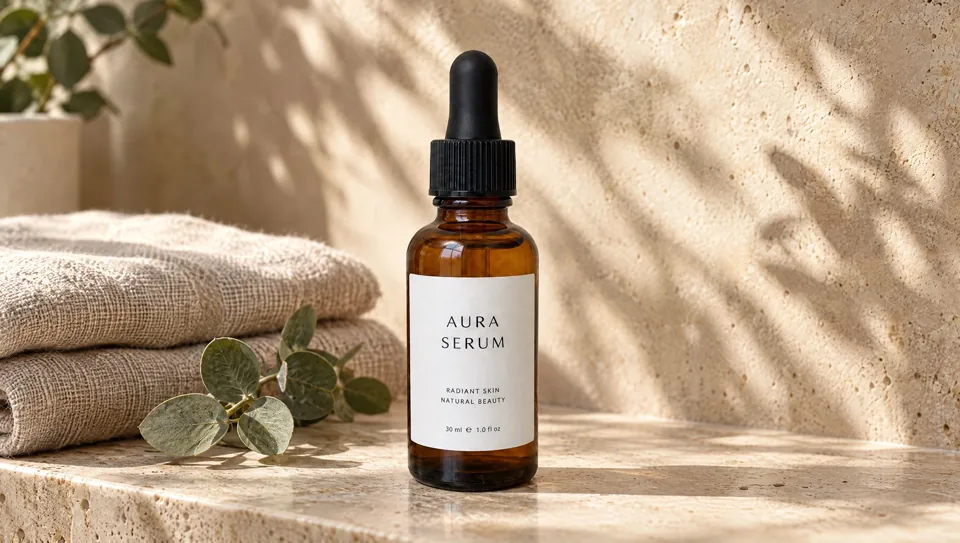
Ask the person first
Put these choices in front of the person before spending anything. Paste the example link next to each option: people pick a look by seeing it.
Set?
- Main image on white + infographics
- Lifestyle scenes — Higgsfield Product Photoshoot · example: https://s3.varg.ai/how-to/previews/147da40e90b7/higgsfield-product-photoshoot.webp
- Both
Platform?
- Amazon (1:1, 1600 px+)
- TikTok Shop (3:4)
- Wildberries / Ozon (3:4)
- Shopify
Extras?
- In-hand scale shot — varg AI · example: https://s3.varg.ai/how-to/previews/7df061df8dcb/varg-ai.mp4
- Feature-callout infographic · real example: https://x.com/rovvmut_/status/2047912710365761828
- Exploded-layer image — Exploded-View Product Reveal · example: https://s3.varg.ai/how-to/previews/751048b1a277/want-exploded-view-reveal.mp4
How to make AI product photos and listing images: step by step
- Photograph or cut out the real product
- Main image: the real photo on pure white, about 85% fill, no text, 1600 px or more; check white level and fill with a script
- Write one style lock (palette, light, background, type, product angle) and prepend it to every secondary image prompt
- Secondary images in order: benefit, scale in hand, close-up, lifestyle, top objection, in the box; edit around the real product with 'replace only the scene, keep the product unchanged'
- Compare every image with the physical product (shape, color, label, parts); tag AI people and keep the IPTC AI metadata
- Export per platform
What works now (researched 2026-10-27)
Winning listings in 2026 pair a real, compliant photo of the actual product (pure white, about 85% fill, no text) with 6 to 8 secondary images that each do one job: benefit, scale in hand, close-up, lifestyle, top objection, what's in the box. AI does the scenes, backgrounds and infographics, not the product itself. Fully rendered main images and unlabeled AI models are now a compliance risk on Amazon, TikTok Shop and Google Shopping.
- Make the main image a real photo of the actual product: pure white RGB 255,255,255, product filling about 85% of the frame, no text, logos, badges or props, at least 1000 px on the long side (1600+ for zoom). These are Amazon's 2026 photography standards. Many categories reject 3D renders and computer-generated main images outright (listing error 13045, 'Image must be a photograph, not an illustration or render'). (Amazon Seller Forums: Product Photography Standards, What's New in 2026)
- Build the secondary images in this order: core benefit, size and scale (in a hand or next to a known object), feature close-up, in use with the likely buyer, the top objection from reviews, what's in the box. Use at least six images. Baymard found that 56% of shoppers start a product page by exploring the images, and 42% try to judge the product's size from them. Missing scale images lead to 'not as expected' returns. (Baymard Institute: in-scale product images)
- Tag AI in the file, not only in your head. On Amazon, add the XMP keyword 'contains-synthetic-performer' to any image, video or A+ module with a photorealistic AI person. For Google Shopping, keep the IPTC 'trainedAlgorithmicMedia' tag (don't let compression strip it). On TikTok Shop, mark AI-generated product imagery as AI. Amazon added the rule in late July 2026 after New York's synthetic-performer law (GBL 396-b, $1,000 first fine, $5,000 after). Google can disapprove products whose AI images lose the metadata. (eWeek: Amazon requires sellers to disclose AI-generated people)
- Export per platform: Amazon square, 1600 px or more. TikTok Shop: a borderless 3:4 first image, above 600 px (800+ is better), and at least 5 images. Wildberries: 3:4 only. Ozon: 3:4 or 1:1. TikTok Shop puts every listing in a Poor, Fair or Good tier. Listings with fewer than 5 quality images can't reach Good, and the tier affects distribution. Russian marketplace sizes per Uniseller's 2026 guide. (soona: TikTok Shop image requirements in 2026)
- Never let the model redraw the product. Cut out the real product, composite it into the AI scene, then check color, proportions and included parts against a physical unit. Amazon has no blanket ban on AI images, but it requires that images 'accurately represent your product'. An AI image that changes color, texture or parts breaks that rule and drives returns. (Canopy Management: Amazon product images that convert (2026))
Stopped working:
- An AI-rendered or 'enhanced' main image. Many Amazon categories reject renders, and TikTok Shop's listing policy bars digital renderings in place of the product.
- Photorealistic AI models in lifestyle or A+ images without the synthetic-performer tag (Amazon, worldwide since late July 2026).
- Claims you can't prove ('#1', 'clinically proven', fake badges) printed on images. Amazon bans badges on the main image, and Wildberries fines sellers for disallowed text.
Prompts that work
Templates from the creators of the best current results and from the model guides. Fill in the {CAPS}.
Scene swap that keeps the real product (gpt_image_2_5)
Secondary and lifestyle images: edit around your real product photo so the product pixels stay true; reuse the same style lock for the whole set. Adapted from buluslan/gpt-image2-ecommerce: edit-bg-swap scenario template and campaign style lock.
Edit the supplied real product photograph. Replace only the surrounding scene with {NEW_SCENE}. The product is {PRODUCT_DESCRIPTION}, identical to the reference image.

Keep the product itself unchanged: exact shape, proportions, packaging, cap, logo, label text, color, material, viewing angle and surface finish. Do not redesign, relabel, duplicate, crop or hide the product. No text, badges or props touching it.

Integration: match the new scene's light ({LIGHT_DIRECTION}), add a realistic contact shadow and matching ambient reflection on the product, no edge halo, seamless composite.

Framing: {SLOT} image, product fills about {FILL}% of a {ASPECT} frame, {SIZE} px, keep {SAFE_AREA} empty for copy.

Style lock (same for every image in the set): palette {PALETTE}; color temperature {COLOR_TEMPERATURE}; background {BACKGROUND_SYSTEM}; lighting {LIGHTING_SYSTEM}; product angle {PRODUCT_ANGLE}.
Feature-callout infographic (gpt_image_2_5)
The benefit image of the gallery: product in hand, the buyer behind it, 3-4 big numbers placed by position. Adapted from rovvmut_ on X: GPT Image 2 earbuds infographic prompt (850 bookmarks).
High-impact e-commerce infographic for {PRODUCT_NAME}, a secondary listing image (not the main image). Use the attached product photo as the exact product: same shape, color, logo and label.

Foreground: an extreme close-up of a hand presenting {PRODUCT_STATE} toward the camera, slight macro blur at the frame edges, the product in sharp focus.
Mid-ground: {BUYER}, using the product in {USE_SETTING}.
Background and light: clean soft-focus {BACKDROP_COLOR} studio gradient, soft professional light that shows the {MATERIAL}.

Typography, sans-serif, {TEXT_COLOR}; render each text exactly once, verbatim:
Top center, behind the subject: huge bold "{CATEGORY_WORD}".
Top right: "{PRODUCT_NAME}".
Mid-left: "{BENEFIT_1}".
Mid-right: large bold "{NUMBER_1}" with "{UNIT_TEXT_1}".
Bottom-right: large bold "{NUMBER_2}" with "{UNIT_TEXT_2}".
No other text, badges or logos except the product's own.

Style: commercial product photography, {PALETTE}, shallow depth of field, {ASPECT}, at least {SIZE} px.
Exploded-layer packshot (gpt_image_2_5)
A what's-inside image with leader-line labels; its last frame doubles as the end frame for a 6 s exploded-view clip. Adapted from Strength04_X on X: iced coffee hero and exploded infographic prompts (GPT Image 2 + Hailuo).
Create a hyper-realistic exploded vertical infographic of {PRODUCT}, matching the attached product photo exactly (shape, color, label).

Top to bottom, the real parts in their real order:
{LAYER_1} ({TEXTURE_1})
-> {LAYER_2} ({TEXTURE_2})
-> {LAYER_3} ({TEXTURE_3})
-> {LAYER_4} ({TEXTURE_4})
-> {BASE_LAYER}

All elements perfectly centered, evenly spaced and aligned on one vertical axis, each floating with a soft realistic shadow beneath it.
Background: {BACKGROUND} seamless, clean studio light, subtle realistic shadows.
Labels: clean minimalist sans-serif text with thin pointer lines, exactly these words and nothing else: "{LABEL_1}", "{LABEL_2}", "{LABEL_3}", "{LABEL_4}", "{LABEL_5}".
Premium commercial photography combined with a clean infographic layout, sharp reflections, {ASPECT}, {SIZE} px.
Trending formats to remake
To remake one: download the example with the media-download skill, take a frame a second and the transcript, write a beat list (time, shot, camera, on-screen text, sound), keep what the format needs, swap in the person's product or character (never the creator's face, voice, logo or footage), show the beat list and stills before spending, then make it with the skill named below.
- The 7-slot listing stack: One cut-out becomes a full gallery: compliant white main image, then benefit, scale in hand, close-up, lifestyle, objection answer and in-the-box, all in one consistent style. Why it spreads: Amazon staff recommend at least six images and one video. Baymard: 56% of shoppers look at images first. TikTok Shop caps listings under 5 images below its Good tier. Keep: Keep a real white-background main image (about 85% fill, no text), then benefit, scale in hand, close-up, lifestyle, objection answer and in-the-box, all under one style lock; swap the product and the copy per slot, never the product pixels. Make it with Higgsfield Marketplace Cards (
higgsfield-marketplace-cards). - Feature-callout lifestyle infographic: A lifestyle shot of the product in use with 3 to 4 big numbers or claims set around it (hours of battery, warranty, key feature), used as a secondary image, never as the main. Why it spreads: It answers the top questions before shoppers read the bullets. The example drew 850 bookmarks on 36k views. Keep: Keep the product held in a sharp macro foreground, the buyer in the mid-ground, a huge category word behind and 3-4 big numbers placed by position; swap in your own name and claims you can prove, and tag the AI person. Make it with E-commerce Image Studio (
ecom-image2).- A shared prompt for this format: https://x.com/rovvmut_/status/2047912710365761828
- Example to remake: @rovvmut_ on X, 2026-04-25, 36K views, 850 saves: Image post, no video (this use case is stills). GPT Image 2 earbuds infographic: a model holds the open case toward the lens, with callouts for noise cancelling, '30 hours of battery life' and '1 year warranty'. Full prompt in the post. It borrows Apple's naming, so swap in your own product. The model is an AI person, so Amazon would need the synthetic-performer tag.
- Exploded-layer packshot: The product on white, split into its labeled layers or components with leader lines. Use the final frame as a secondary image and the 6 s animation for the video slot. Why it spreads: It shows what is inside without a wall of text. The iced-coffee example saved at 0.77 bookmarks per like. Keep: Keep a centered vertical stack of the real layers in their real order, even spacing, a soft shadow under each part and thin leader-line labels on a plain ground; swap the layers and labels, and use the last frame as the listing image. No dedicated skill yet (wanted): build it with
varg-ai.- A shared prompt for this format: https://x.com/Strength04_X/status/2049082049995362785
- Example to remake: @Strength04_X on X, 2026-04-28, 31K views, 475 saves: Iced coffee on pure white separates into foam, coffee, ice, milk and glass, and the labels draw in. The last frame is a ready-made listing image. Prompt in the post.
Open-source repos
- buluslan/gpt-image2-ecommerce (428★): E-commerce image skill with 39 scenario templates (main image, lifestyle, infographic, A+, size chart, background swap) for GPT Image 2/2.5. How: Matches the request to a JSON scenario template, prepends a 10-field style lock (palette, light, background, type, product presentation, immutable items) to every image of the set, orders a 7-slot listing funnel, generates through any OpenAI-compatible endpoint, then runs compliance_check.py for white background, product fill and OCR text. Install as a skill: https://varg.ai/how-to/skills/ecom-image2.md
- fal-ai-community/skills (257★): fal's commercial skill for product photography, e-commerce batches and background replacement. How: Keeps one prompt skeleton for a batch and varies only background, crop, light or platform size; uses Nano Banana edit with the product photo for fidelity and GPT Image 2 for text-heavy infographics; leaves empty space for copy that is added later in a design tool. Install as a skill: https://varg.ai/how-to/skills/fal-commercial.md
Set up varg
varg is one API key for the models these skills drive — Seedance 2.5, Kling 4, Veo 3.1, Wan 3, Nano Banana 2.1, GPT Image 2.5, ElevenLabs v4 and 200+ more — billed in credits, with a cost estimate before anything runs.
- Claude Code:
claude plugin marketplace add vargHQ/skills && claude plugin install varg@varg(skill + hosted MCP) - Codex, Cursor, Gemini CLI, OpenClaw:
npx skills add vargHQ/skills --skill varg-ai -a <agent> -y - Grok and any agent that reads SKILL.md:
npx skills add vargHQ/skills --skill varg-ai, or point it at the skill's SKILL.md - Claude.ai, ChatGPT, any MCP client: connect
https://mcp.varg.ai/mcp - API key: https://varg.ai/dashboard/api · Model specs: https://varg.ai/models/llms.txt
Related tutorials
- How to turn a product photo into a video with AI: A product shot turned into a short promo: orbit, push-in, exploded view or bullet time, with music.
- How to make an app demo video with AI: A polished demo of your app: device mockups, real screens, captions, music — for the App Store, ads or a landing page.
- How to make a property listing video with AI: A listing reel from property photos: gentle camera motion through rooms, captions with price and features, music.