Chengfeng Videocut — workflow skill for editing & clips
For AI agents: find the right skill in one call —
curl -s "https://varg.ai/how-to/api/search?q=<what the person wants>"returns the matching how-to page and the best skills with install commands, as markdown (Russian works too). Full index: https://varg.ai/how-to/llms.txt. Every page has a markdown twin: add.mdto its path. Before generating anything, show the person the options on the how-to page.
Chinese talking-head editing: word-level transcript, five-pass flub sweep, human review in a Studio, subtitles, export.
- Type: Workflow · Editing & clips
- Slug:
chengfeng-videocut - Status: live
- Publisher: chengfeng (community)
- License: Apache-2.0
- Source: https://github.com/Agentchengfeng/chengfeng-videocut-skills
- Works in: Codex
- Requires: Codex CLI with plugin support, Node.js 18+ and Git, A cloud ASR for word-level transcription
- Cost: Free plugin; cloud transcription billed by your ASR provider
- Adoption: 2,802 installs, 3,135 GitHub stars (GitHub + skills.sh, 2026-10-26)
What it does
A Codex plugin for editing Chinese talking-head footage. The cut skill transcribes word by word with a cloud ASR, fixes misheard terms from a dictionary, runs five separate scans for flubs and repeats, and produces a deletion ledger that you approve in a local Studio before anything is cut; sibling skills add subtitles and HTML visual layers, and the export skill burns cuts, push-ins, subtitles and visuals into one MP4 in a single pass. Your corrections and dictionary fixes are kept for the next session. The plugin installer pins exact source commits, and the Studio runtime comes from a pinned release checked against SHA-256.
Use when
- Cut flubs, repeats and dead air from a Chinese talking-head recording
- Add subtitles and visual layers, then export one MP4
Not for
- Non-Chinese speech (dictionary and rules are Chinese-first)
- Local-only transcription (it requires a cloud ASR)
Install
- Codex:
node bin/install.cjs install
Example output
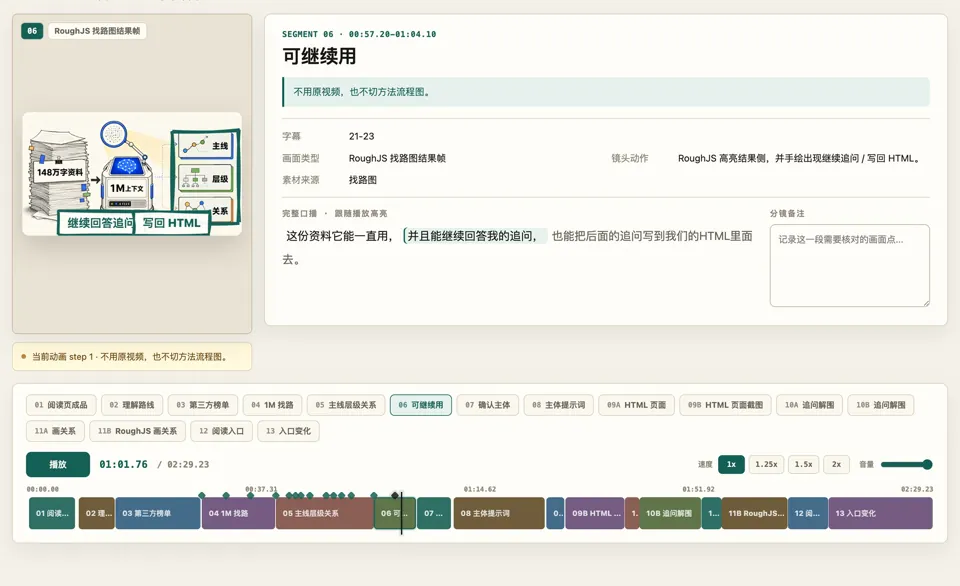
https://s3.varg.ai/how-to/previews/e62a09a47006/chengfeng-videocut.webp — Screenshot from the creator's X article on the Codex upgrade: the skill's storyboard review page, with a generated hand-drawn frame, the word-highlighted talking-head transcript and the colored segment timeline. Still image of the tool in use; no clean output clip from the creator was found. (credit: 成峰 Chengfeng (@agentchengfeng), https://x.com/agentchengfeng/status/2068932528317071404)
How-to tutorials that use it
- How to edit your own video footage with AI: Cut silences and flubs, reframe 16:9 to 9:16, add captions and b-roll to footage you shot.
More editing & clips skills
- Short-form FFmpeg cookbook: copyable commands for Reels: Footage into a 9:16 MP4 with FFmpeg: crop to vertical, burn captions, trim and join, music under the voice.
- Splice AI clips into a video with FFmpeg: Splice generated clips into an original video with ffmpeg without A/V drift: absolute trims, one audio track.
- Claude Code Video Toolkit: Open-source video workspace for Claude Code: script, voice, music, visuals and Remotion render on your own GPU account.
- Herk Edit Kit: Nate Herk's kit to edit talking-head videos, reels and Shorts: silence and flub cuts, storytelling, motion graphics.
- Clipify: Long videos into social clips: find funny lines or impact beats, cut, reframe to 9:16, burn word-by-word captions.
- VectCut: Drives the VectCut editing API: talking-head cuts, remixes, e-commerce ads, subtitles, effects, cloud render