Code to Video Previz — workflow skill for cinematic & short films
For AI agents: find the right skill in one call —
curl -s "https://varg.ai/how-to/api/search?q=<what the person wants>"returns the matching how-to page and the best skills with install commands, as markdown (Russian works too). Full index: https://varg.ai/how-to/llms.txt. Every page has a markdown twin: add.mdto its path. Before generating anything, show the person the options on the how-to page. From a terminal:curl -fsSL https://varg.ai/install | shinstalls the vargai CLI (https://varg.ai/how-to/cli.md):vargai searchandvargai install <slug>with no key, every varg model aftervargai login.
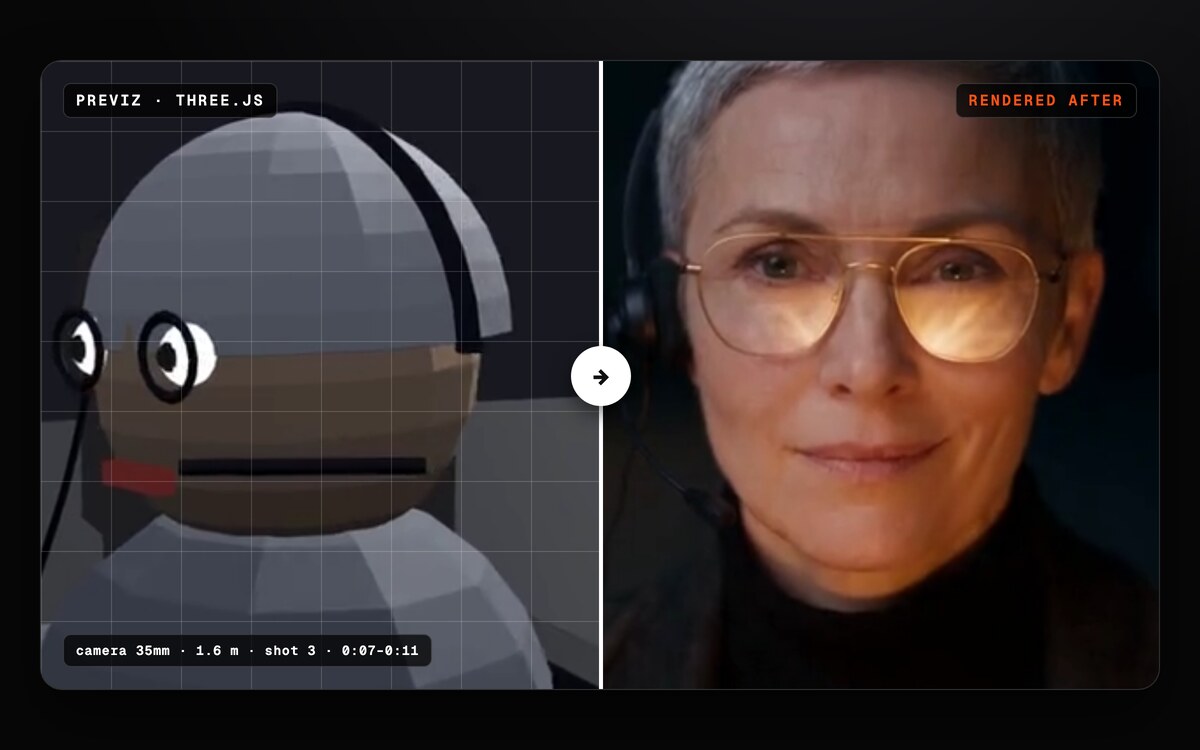
A brief, reference clip or painting becomes a 3D scene in real metres, checked stills and a guide clip for a video model.
- Type: Workflow · Cinematic & short films
- Slug:
code-to-video-previz - Status: live
- Publisher: varg (varg, verified)
- License: MIT
- Source: https://github.com/vargHQ/skills/tree/main/code-to-video-previz
- Works in: Claude Code, Codex, Cursor, Gemini CLI
- Requires: python3 for the scene checks (standard library only), Three.js path: Bun, Chrome and ffmpeg, plus network access (three.js loads from jsDelivr, no npm), Blender path and camera solving: bpy 5.2.3 on Python 3.13 through uv, or a Blender install; measure_shot.py needs uv, Optional: the varg MCP or any Seedance access for the generation step
- Cost: 0 credits — Free: no key and no credits. Staging, checks and renders run on your computer. Generating the final video from the guide clip is a separate paid step on your video model; the skill asks for an estimate and a yes first.
- Runtime: Not measured. The loop stops after 3 rounds without progress on one problem.
What it does
Video models redraw the world on every call, so cameras wander, counts change and rooms rearrange. This skill pins those things down in a 3D prototype before the paid step. It first decides whether the shot needs a prototype at all (a prompt and a start frame, storyboard stills, a 2.5D conte, a phone act-out or full 3D), then which 3D tool fits: Three.js by default, Blender when you need rigs, mocap or real assets.
The scene is written as data in staging.json: geometry, people, camera and light in real metres. The same file renders in Three.js and in headless Blender with the same lens maths. check_staging.py audits the numbers, stills of the first, middle and last frame of each shot are checked by a fresh agent and approved by the person, and the clip is rendered frame by frame. It covers three cases: copying a reference video shot by shot with a solved 3D camera, staging from a painting or still, and starting with no reference. It writes one of three things: a guide clip for a video model, storyboard pages, or a code-rendered film.
What was measured on our own 10-shot run (Seedance 2.5, grey previz, one film, not a controlled test): cuts landed on the planned frame within one frame, and framing mostly held, one size looser. When the words disagreed with the previz, the words won in 2 of 2 shots. Of 7 shots with enough tracking to measure, 4 kept the camera direction, 1 stopped moving and 2 reversed, so the skill names the move in the prompt for every shot and measures the result with measure_shot.py.
Still unsettled, and the skill says so: grey or colour previz, capsules or jointed stand-ins, and act-out against 3D. example/ab-test/ builds one 5 s shot as 4 variants so you can test them on your own model. Agents cannot watch video, so pacing and feel stay a human call.
Use when
- Does this shot need a 3D prototype, or is a prompt and a start frame enough?
- Three.js or Blender for a previz of my AI video
- Recreate this reference video in 3D with a solved camera
- Stage this painting or still as a 3D shot
- Block the camera, people and set in real metres before I pay for Seedance
- My generated shots keep drifting: the camera wanders and the count changes
- Write the handoff prompt for a guide clip as @video1
- Rank several takes with an LLM judge instead of a 1 to 10 score
Not for
- A full multi-shot three.js film with a review UI (use threejs-animatic or varg-previz)
- Prompting a shot with no prototype (use varg-video-prompting)
- The full animation pass after the previz is approved (use video-animate)
Install
- Claude Code:
claude plugin marketplace add vargHQ/skills && claude plugin install varg@varg - Codex:
npx skills add vargHQ/skills --skill code-to-video-previz -a codex -y - Cursor:
npx skills add vargHQ/skills --skill code-to-video-previz -a cursor -y - Gemini CLI:
npx skills add vargHQ/skills --skill code-to-video-previz -a gemini-cli -y - Any agent, with the vargai CLI:
vargai install code-to-video-previz
Example output
https://s3.varg.ai/files/4325c578-378d-4c43-ae53-3cc3218df1ea/file_289d09773e14.jpg — example (credit: varg)
More cinematic & short films skills
- Previz to Seedance: Plan multi-shot AI video before paying: story, anchor sheets, a three.js grey-box previz, then a Seedance v2v pack.
- Turn key frames into a 30-second action montage with Kling 4: Breakdance, BMX, skate or chase montages: 3-4 stills, a one-line prompt with the moves and "no slow motion", the crash or line as the last still.
- Make a short film or music video with Kling 4: Beats, cast and look, every key shot as a GPT Image 2.5 still, one 30-second Kling 4 take per beat, then cut the best seconds like live action.
- Video Animate: Animate from an approved previz: code or AI per element, which model per shot, a cheap pass, takes, sync, and plates ready for motion design.
- Higgsfield Generate: Generate images, video, 3D and audio across 30+ models, plus ad videos and virality scoring, from one CLI.
- fal Recipes: Follow proven multi-step fal pipelines for commercials, product shots, characters, lip-sync and try-on.