EffectCraft MCP (open-source After Effects alternative) — guide skill for animation & motion graphics
For AI agents: find the right skill in one call —
curl -s "https://varg.ai/how-to/api/search?q=<what the person wants>"returns the matching how-to page and the best skills with install commands, as markdown (Russian works too). Full index: https://varg.ai/how-to/llms.txt. Every page has a markdown twin: add.mdto its path. Before generating anything, show the person the options on the how-to page. From a terminal:curl -fsSL https://varg.ai/install | shinstalls the vargai CLI (https://varg.ai/how-to/cli.md):vargai searchandvargai install <slug>with no key, every varg model aftervargai login.
Open-source After Effects-style compositor in Rust; its MCP server lets an agent build comps, keys and effects.
- Type: Guide · Animation & motion graphics
- Slug:
effectcraft-mcp - Status: live
- Publisher: ArtCraft (storytold) (community)
- License: MIT OR Apache-2.0
- Source: https://github.com/storytold/effectcraft
- Works in: Claude Code, Cursor, Any MCP client
- Requires: An EffectCraft release with effectcraft-cli (on macOS the separate effectcraft-cli zip), or Rust 1.95+ to build it, GPU optional: headless MCP renders on the CPU unless started with --gpu
- Cost: Free, MIT or Apache-2.0. Renders locally; no telemetry and no network access unless you ask for it.
- Adoption: 8,697 GitHub stars (GitHub, 2026-11-13)
What it does
EffectCraft (storytold/effectcraft) is the ArtCraft team's free, clean-room motion graphics and compositing app, written in pure Rust under MIT or Apache-2.0; its first commit was on 1 October 2026 and it is still alpha. It works the way After Effects users expect: layered compositions, keyframes with a graph editor, 308 built-in effects, JavaScript expressions, 3D cameras and lights, Lottie import and export, and a render queue to H.264, ProRes, HEVC, AV1, WebM and EXR with no FFmpeg inside. Every menu action is an engine command, so effectcraft-cli mcp lets Claude Code or any MCP client create comps, set keys, apply effects and render frames, headless or bridged to the open app.
How to use EffectCraft MCP (open-source After Effects alternative), step by step
- Download a build from getartcraft.com/apps/effectcraft or GitHub Releases: a universal macOS DMG, a Windows MSI or portable zip (x64, x86, ARM64), or a Linux AppImage, Flatpak, deb, rpm or tarball. The macOS app does not include the CLI: also get
effectcraft-cli-<version>-macos-universal.zipand puteffectcraft-clion your PATH. On Windows the CLI is%LOCALAPPDATA%\Programs\ArtCraft\EffectCraft\effectcraft-cli.exe(not on PATH); Linux deb and rpm install/usr/bin/effectcraft-cli. - Register the MCP server in Claude Code:
claude mcp add effectcraft -- effectcraft-cli mcp. In Windows PowerShell:claude mcp add effectcraft -- "$env:LOCALAPPDATA\Programs\ArtCraft\EffectCraft\effectcraft-cli.exe" mcp. Cursor and Claude Desktop take the same command and["mcp"]args in their MCP config. - Recommended: add
--automation-read-root <dir> --automation-write-root <dir>so the agent can only read and write one project folder, and--autosaveso headless work survives a server restart. - Restart the agent and ask: "Make a 4-second 1920x1080 comp, slide the word Hello in from the left with Easy Ease, add a Glow, show me the frame at 1 second, then save intro.ecproj."
- Watch the calls:
execute_commandwithcomp.newandlayer.newText,add_keyframeontransform/position,add_effect, a look at the result withrender_frame, andsave_project. - Render without the app:
effectcraft-cli render --comp Main --out main.mp4, or export Lottie witheffectcraft-cli exec file.exportLottie '{"comp":"Main","path":"main.json"}' main.ecproj. - To see every change live, start the app with
effectcraft --control 9877and registereffectcraft-cli mcp --bridge 9877instead; bridge mode adds screenshots and tools that click and type in the UI.
What the MCP server gives an agent
Everything in EffectCraft is an engine command with an id and JSON parameters, and the menus, the CLI, the control channel and MCP all call the same commands.
- Discover:
list_commands(withfilter, and JSON Schemas on request),describe_command,list_effects,list_fonts,get_state. - Inspect:
get_project,get_comp,get_layer(the property tree, each node with itspath),get_property. - Edit:
execute_command,set_property(a value, a key at a time, or an expression),add_keyframe(linear, Bezier, hold or Easy Ease),add_effect(apply and set values in one undo step),batch(several commands, one undo step, later steps can use$N.keyfrom earlier ones),run_script(JavaScript with an After Effects-style object model),undo,redo,history. - Look and save:
render_frame(a PNG, optionally with alpha),open_project,save_project. - Shared Craft tools:
command_list,command_run,command_batch,doc_inspect,render_preview, and the resourceseffectcraft://documentandeffectcraft://commands, the same conventions PhotoCraft and FilmCraft use. - Bridge only:
screenshot,ui_inspect,ui_elements,ui_click,ui_drag,ui_key,ui_type,ui_set,control.
Layers are addressed by id, by "#n" (1 is the top layer) or by name; comps by id or name, defaulting to the active one.
Headless or bridged
- Headless (
effectcraft-cli mcp): no window, instant start, CPU rendering unless you add--gpu. Add--demoor--project file.ecprojto start with content. Best for batch work and CI. - Bridged (
effectcraft-cli mcp --bridge 9877): drives an app started witheffectcraft --control 9877, so you see each edit, and the agent can screenshot panels.
The repo ships a .mcp.json with both entries, but they run through cargo run, so they compile on first start; run cargo build --release -p effectcraft-cli first or the client may time out.
Gotchas the docs warn about
- Layer time and comp time differ.
add_keyframeandset_propertytake layer seconds,render_frameandget_propertycomp seconds. On offset layers passtimeBase: "comp"(#257). - Save often. Without
--autosavea headless project lives only in memory untilsave_project. - One render at a time. A render works on a snapshot of the project; a second render is refused until it ends. Pass a
progressTokenfor progress and cancel withnotifications/cancelled. - Confinement has a price. With read/write roots set, scripts, Execute File and the bridge's UI tools are refused.
What the app covers
Solids, shapes, text, footage, precomps, nulls, adjustment layers, cameras and lights; parenting, track mattes, 38 blend modes and motion blur; shape operators such as trim paths and repeaters; masks drawn with a pen; text animators with range selectors; puppet pins; Roto Brush (optional MobileSAM download), face tracking, Warp Stabilizer and a 3D camera tracker; keying; 308 effects including particles and simulations. Output: H.264 MP4, ProRes up to 4444 XQ with alpha, HEVC, AV1, WebM with alpha, image sequences up to 32-bit EXR, GIF and WAV/AIFF; Lottie both ways. Projects are versioned JSON (.ecproj) that diff cleanly in git.
Where it stands
The README calls it alpha: about 91% of the features in its parity list exist, and the team estimates it is about 45% of the way to full professional production use. macOS is the most tested platform; Linux and Windows users have hit basic interaction bugs that are fixed first. Releases ship almost daily, so update before reporting a bug.
The Crafting Apps
EffectCraft is one of ArtCraft's Rust apps that each ship an MCP server with the same command model: PhotoCraft for images, FilmCraft for editing and colour, and others. One way to chain them: cut generated clips in FilmCraft, add titles and effects in EffectCraft, and make stills and PSDs in PhotoCraft.
Use when
- Build titles, lower thirds and motion graphics with an agent, then render MP4 or ProRes
- Drive After Effects-style comps from code: keyframes, expressions, effects, render queue
- Export an animation as Lottie JSON for the web or an app
- Key, track or composite generated footage without an Adobe licence
Not for
- Opening any After Effects project as is: .aep import is partial and lists what it drops
- After Effects plug-ins (.aex): they do not run; EffectCraft plug-ins are WebAssembly or Rust
- Production client work today: the team itself calls it alpha
Install
- Claude Code:
claude mcp add effectcraft -- effectcraft-cli mcp - Any agent, with the vargai CLI:
vargai install effectcraft-mcp
Example output
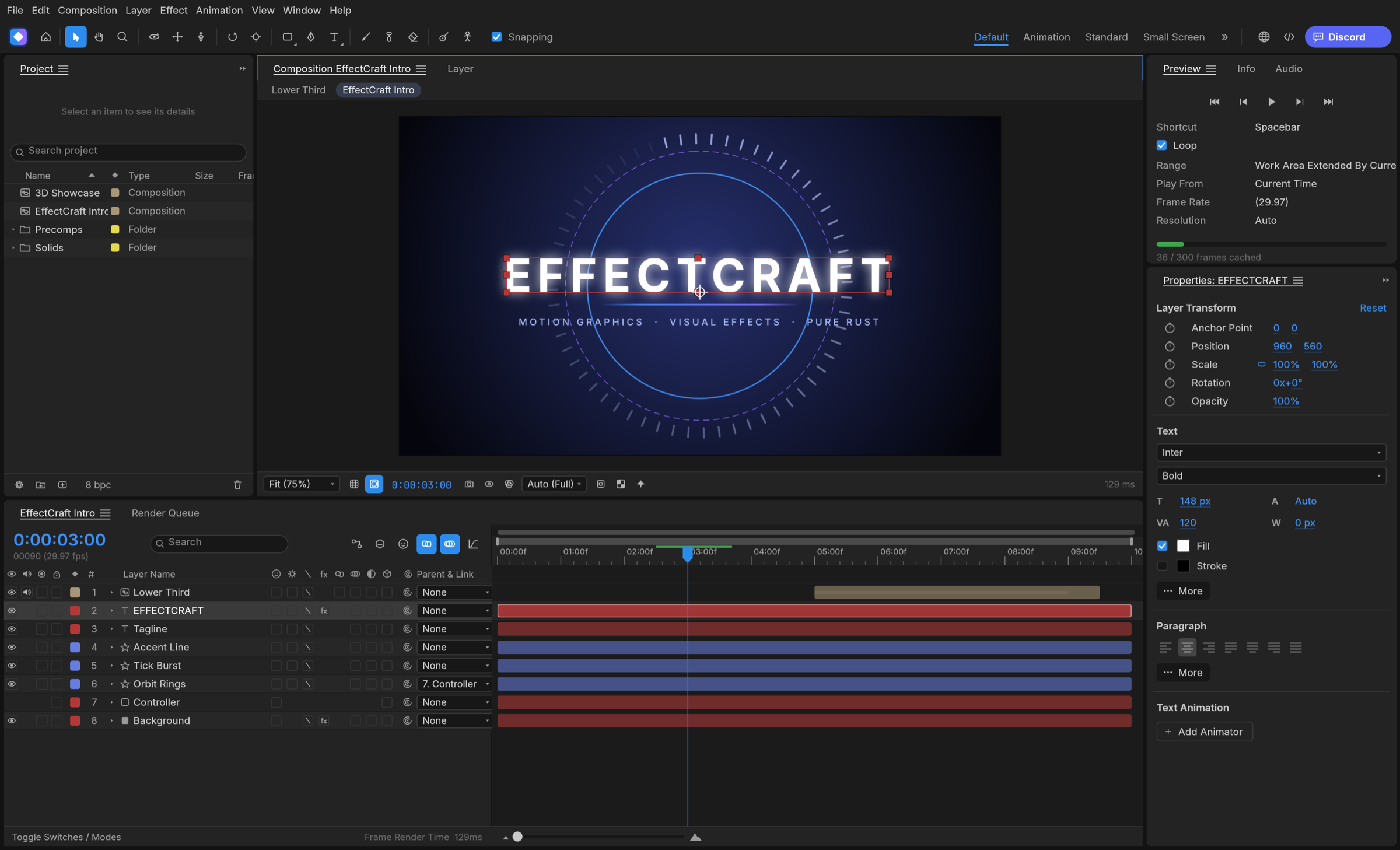
https://raw.githubusercontent.com/storytold/effectcraft/main/docs/images/effectcraft-hero.png — EffectCraft's main window: composition viewer, Project panel, Timeline with text, shape and solid layers, Properties panel (README hero) (credit: ArtCraft (storytold) (README), https://github.com/storytold/effectcraft)
EffectCraft MCP (open-source After Effects alternative): questions and answers
Can EffectCraft open After Effects .aep files?
Partly, since v0.22: File ▸ Import ▸ Adobe After Effects Project… (or dropping the file on the window) brings in what it can map exactly, such as layers, masks, shapes, text and animators, keyframes, cameras, lights, layer styles and a growing list of effects, and it lists everything it would lose before it imports. Opening an .aep directly as a project is in progress (#190).
Do After Effects plug-ins like Deep Glow or Flow work?
No. After Effects SDK plug-ins cannot run. EffectCraft loads its own effect plug-ins (WebAssembly modules or Rust) from its Plug-ins folder and runs .jsx/.js scripts and ScriptUI panels. Requests for ports are collected in #322.
Is it free for commercial use?
Yes. It is MIT or Apache-2.0 at your option, with no telemetry. The ArtCraft name and logos are trademarks and are not covered by the licence.
On Windows some effects are slow, as if the GPU is not used.
On DirectX 12 without dxcompiler.dll, a few GPU kernels fail to compile and those effects quietly fall back to the CPU; the compositor itself now starts on DX12, and Vulkan works (#613). In headless MCP the GPU is used only with --gpu.
The disk cache grows by gigabytes in a few hours.
Cap it in Settings › Disk › Disk Cache › Maximum Disk Cache. Newer builds default to 20 GB instead of 100 GB (#2551).
Preview is silent but the exported video has sound.
One confirmed cause: preview drops audio when the Preview panel's frame rate differs from the comp's (a 30 fps preview of a 60 fps comp). Keep them equal until the fix ships (#945).
Which platforms are there?
One universal macOS app (Apple silicon and Intel), Windows x64, x86 and ARM64, Linux x86_64 and aarch64 (plus a riscv64 tarball), FreeBSD, and a web build that runs the full app in the browser.
Alternatives to EffectCraft MCP (open-source After Effects alternative)
- ae-mcp (After Effects MCP): You own After Effects and want an agent to edit real .aep comps through MCP.
- PhotoCraft MCP (agent-driven photo editor): The same team's Photoshop-class editor with the same command model, for stills, PSDs and title cards.
- FilmCraft MCP (agent-driven video editor): The sibling video editor: cut, trim and grade the clips your EffectCraft renders go into.
- Motion Design: Lottie-first motion design with LottieFiles' own skill, for web and app animation.
- HyperFrames: Write motion as HTML and render it to video, when web code suits you better than a compositor.
- Bang Motion: An agent writes openers and kinetic type as one HTML file; nothing to install.
Guide written by varg from the ArtCraft (storytold) source, checked 2026-11-13.
More animation & motion graphics skills
- Turn any still into a looping GIF: A still, mascot or prompt to a looping GIF on GPT Image 2.6: frame sizes that fit, loop wording, WebP export.
- Turn a character into a game sprite sheet: 2D game sprite sheets on GPT Image 2.6: a 4x4 spec that slices cleanly into frames, a GIF and a Phaser atlas.
- Day in My Life: A 60–75 s hand-drawn ink film of your agent's day with you, built from local Claude Code history, scored for strings.
- p5 Paint Animation: Handwriting that writes itself, photos that paint themselves and clips repainted as living paintings, in p5.js code.
- Session Story: A 40–70 s watercolor film of a typical session with your agent, told in your real messages, with its own score.
- Remotion Markup: Write Remotion markup that animates well: timing, transitions, motion blur, effects, audio, fonts and 3D.